kdos-shell
kdos-shell is the program behind almost everything a person clicks on the KDOS desktop: the
panel along the bottom of the screen, the Start menu, the search palette, the desktop icons, the
file chooser, the control centre, the device managers, the notification daemon and some forty
smaller windows and popups. It is one C binary, built from src/desktop/kdos-shell/, that behaves
as a different program depending on the name it is started under. This chapter describes every
one of those programs: what it shows, which key opens it, which file configures it, and why it
behaves as it does. It assumes you have read The desktop, which
introduces the same windows from a user’s point of view, and
The design language, which sets the colour, chrome and
key rules every window here follows and which this chapter does not repeat.
The chapter serves three kinds of reader:
The order is from the general to the particular: how the binary dispatches, the conventions all
its programs share, the panel, the large surfaces one by one, the small ones in tables, and last
the complete option reference.
Invocation
kdos-shell is one binary that answers to 55 command names. It is installed once at
/usr/bin/kdos-shell and symbolically linked under its other 54 names (/usr/bin/kdos-start,
/usr/bin/kdos-settings, and so on). A surface on this page means one of those programs: one
window, popup or daemon. The glossary keeps the word for a
window or popup and calls the windowless programs helpers; this chapter counts every one of the 54,
because they share one dispatch table, one build and one set of conventions.
When it starts, it takes the file name it was run under (the basename of argv[0]) and looks it
up in the dispatch table in main.c. A name that matches runs that surface with the whole argument
vector. Run as kdos-shell itself, it is the panel.
When the binary is run under a name that is not in the table (a freshly compiled ./a.out
before any link exists, for example), it reads the first argument as the surface name instead, so
./a.out kdos-launcher opens the launcher. If neither the name nor the first argument matches,
it prints kdos-shell: no tool named '<name>' and the list of every name to standard error, and
exits 2.
The fallback never applies to kdos-shell itself. kdos-shell is in the table (it is the panel),
so kdos-shell kdos-launcher starts the panel, which rejects the unknown argument with its usage
line and exit status 2.
The 55 names reach 54 distinct surfaces: kdos-launcher and kdos-palette are the same search
program, which reads the name it was started under and shows applications only when it is
kdos-launcher. One program means one matcher and one idea of ranking.
A name in the table with no matching entry point fails to link, so it is caught at compile time. A
name the build creates no link for is a program nothing can start; build.sh installs the binary
and creates one link for each of the other 54 names in the table.
One binary instead of fifty-four has a reason beyond disk space. Every surface shares the font
cache, the palette and the whole cell-grid toolkit, so two surfaces cannot drift into two
different pictures of the same desktop. The binary links the libraries it uses (libkwl,
libkdisp, libkcell, libktui, libkcolor, libkbase, libkxdg, libkicon, libkchrome,
libkproc, libkimg, libkwm, libksig) statically from the source tree; see
The C libraries.
The surfaces
| Name |
Is |
Detail |
kdos-shell |
The panel |
The panel |
kdos-start |
The Start menu |
kdos-start |
kdos-launcher |
The palette restricted to applications |
kdos-palette and kdos-launcher |
kdos-palette |
One search over everything the desktop can reach |
kdos-palette and kdos-launcher |
kdos-menu |
The Applications, Places, System and window menus |
kdos-menu |
kdos-desk |
The desktop, its icons and its context menu |
kdos-desk |
kdos-pick |
The file chooser, and the file browser |
kdos-pick |
kdos-settings |
The control centre, nine categories |
kdos-settings |
kdos-net |
Networking |
kdos-net |
kdos-netagent |
The passphrase NetworkManager asks for |
kdos-netagent |
kdos-bt |
Bluetooth |
kdos-bt |
kdos-audio |
Audio outputs and Bluetooth audio devices |
kdos-audio |
kdos-devices |
Cameras, microphones, scanners, removable media |
kdos-devices |
kdos-disks |
Disks: mount, unlock, SMART, write an image, format |
kdos-disks |
kdos-connect |
A folder on another machine, over SMB |
kdos-connect |
kdos-print |
Printers: what is set up, what is on the network |
kdos-print |
kdos-notifyd |
The notification daemon |
Notifications |
kdos-notify |
The notification centre |
Notifications |
kdos-osd |
Volume and brightness |
kdos-osd |
kdos-store |
The application store |
kdos-store |
kdos-trash |
What was deleted, and the way back |
kdos-trash |
kdos-peek |
What is in a file, without its application |
kdos-peek |
kdos-pix |
One picture, and the folder it is in |
kdos-pix |
kdos-find |
Files by name or contents, applications, recents |
kdos-find |
kdos-rec |
Record a microphone, and transcribe it |
kdos-rec |
kdos-keys |
The keybinding card |
kdos-keys |
kdos-style |
How the screen looks: the accent, and the font |
kdos-style |
kdos-saver |
Attract mode, started by Super+Shift+L or by hand; idle does not start it |
kdos-saver |
kdos-ime |
The input-method candidate window |
kdos-ime |
kdos-status |
The overflow popup |
The overflow chevron |
kdos-traymenu |
A tray item’s own menu, from its dbusmenu tree |
The tray |
kdos-tip |
Tooltips |
Tooltips |
kdos-clip |
Clipboard history: the daemon, and the picker |
The desk accessories |
kdos-mediad |
The removable-media toast |
Background services |
kdos-cal |
The calendar |
The desk accessories |
kdos-calc |
The calculator |
The desk accessories |
kdos-note |
The scratch pad |
The desk accessories |
kdos-chars |
The character map |
The desk accessories |
kdos-contacts |
The address book |
The desk accessories |
kdos-about |
What this machine is |
The desk accessories |
kdos-teams |
The window list |
The desk accessories |
kdos-doc |
The documentation viewer |
kdos-doc |
kdos-display |
Screen configuration |
The system surfaces |
kdos-time |
The zone, the clock, and whether the clock is right |
The system surfaces |
kdos-users |
The accounts, and which one tty1 logs in |
The system surfaces |
kdos-update |
What is behind, what is vulnerable, which slot is live |
The system surfaces |
kdos-firewall |
Which services answer the network |
The system surfaces |
kdos-backup |
What is in the restic repository, adding to it, and restoring from it |
The system surfaces |
kdos-burn |
A folder or an image onto an optical disc, and the disc checked |
The system surfaces |
kdos-verify |
Files against a checksum list or a par2 set |
The system surfaces |
kdos-openwith |
Choose a handler for one file |
The small dialogs |
kdos-run |
The run box |
The small dialogs |
kdos-prompt |
Yes/no by exit status; --input asks for a line |
The small dialogs |
kdos-slit |
The dockapp column |
The small dialogs |
kdos-ascii |
A picture, as characters |
The small dialogs |
Chords
A chord is a key combination. These are the chords that open a surface of this binary, as
shipped in /etc/skel/.config/kdos-comp/rc.xml (copied to ~/.config/kdos-comp/rc.xml when an
account is created). Super is the Windows or Command key. Edit your own copy to rebind them; the
compositor reads it at start and on reconfigure.
| Chord |
Opens |
Super+Space |
kdos-palette |
Super+D, Super+F7 |
kdos-launcher |
Super+A, Super+F10 |
kdos-start |
Super+I |
kdos-settings |
Super+F1 |
kdos-keys |
Super+F2 |
kdos-teams |
Super+F3 |
kdos-audio |
Super+F4 |
kdos-net |
Super+F5 |
kdos-bt |
Super+F6 |
kdos-devices |
Super+C |
kdos-cal |
Super+P, the display key |
kdos-display |
Super+/ |
kdos-doc |
Super+Shift+F |
kdos-find |
Super+Shift+L |
kdos-saver |
Super+Shift+N |
kdos-notify |
Super+Ctrl+Q |
kdos-calc |
Super+Ctrl+N |
kdos-note |
Super+Ctrl+E |
kdos-chars |
Super+Ctrl+B |
kdos-contacts |
Super+Ctrl+V |
kdos-clip (no argument: the history daemon, not the picker) |
Super+Ctrl+Shift+Space |
kdos-style |
Super+Ctrl+C |
kdos-palette --route capture |
Super+Ctrl+H |
kdos-palette --route setup |
Super+Shift+Space |
kdos panel toggle |
Alt+F2 |
kdos-run |
| Volume up and down, mute |
kdos-osd volume +5, -5, toggle |
| Microphone mute |
kdos-osd mic toggle |
| Brightness up and down |
kdos-osd brightness +10, -10 |
The shipped Super+Ctrl+V binding opens no picker; the kdos-clip row under
The desk accessories says why and how to rebind it.
Other chords in the same file start programs that are not this binary, among them foot,
kdos-lock, kdos-power, kdos-session-save, kdos-res, kdos-energy, kdos-shot,
kdos-record, kdos-mpctl and the kdos command. They are listed in
the desktop guide.
Conventions every surface shares
The rules in this section hold for every surface, so a person who has learnt one window has learnt
how the others behave. The key contract and places matter to anyone using the desktop; launching,
opening a terminal, popup anchoring and offscreen rendering are mostly of interest to contributors,
because they name the one function each surface must go through. The surface runner is the one
loop ten of the surfaces share rather than write.
The key contract
Forty of these surfaces answer the same key contract, and the bottom row of each says what
the rest of its keys do at that moment. Esc steps back one level and only then closes; F1 opens
the surface’s page in kdos-doc where it has one. The layers Esc steps back through (a
confirmation, a search, a selection) are declared by each surface and form its Esc ladder; each
layer is a rung, named in the hint row by what Esc does there, such as Cancel or Deselect.
The full rule, covering the ladder, the hint row and the &-marked accelerators, is in the design
language.
Eight surfaces claim an F1 page: kdos-backup, kdos-bt, kdos-connect, kdos-devices,
kdos-display, kdos-net, kdos-rec and kdos-settings, plus kdos-res, which
is a separate binary. The pages live in /usr/share/kdos/doc and testing/preflight.sh refuses a
claim with no file behind it, so a surface not in that list neither advertises F1 nor answers it.
Two menus take the ladder and not the hint row: kdos-menu’s cascade and its --windows list.
Both are overlays sized to their content, so a hint row has to be bought out of the height they ask
for, and the System menu is 22 items against a 24-row cap, exactly full, so reserving one scrolls
Shut Down off the bottom of the menu somebody opened in order to shut down. The row would also be
restating what a menu already says: Enter, the arrows and Escape are what a column of labels means.
Fourteen surfaces do not use the contract, and they split into two groups. Eight answer no keys at
all: the panel itself, the daemons kdos-notifyd and kdos-mediad, the transient chrome
kdos-tip, kdos-slit, kdos-saver and kdos-ime, and the filter kdos-ascii. The other six
(kdos-start, kdos-traymenu, kdos-netagent, kdos-osd, kdos-run and kdos-prompt) answer
keys from a switch of their own. kdos-run and kdos-prompt are fewer than eight rows tall, and at
that height a hint row would take a third of the window; the rest are popups whose whole key
vocabulary is the arrows, Enter and Escape.
Launching
Every launch surface in this binary calls sh_launch(): the Start menu, the palette, the desktop’s
icons, kdos-find, Open With, the run box, the panel’s quick-launch row, its taskbar chips and
kdos-menu’s rows. sh_launch() lives in apps.c, and launch.h carries the rule and is the
header a new surface includes.
One shared path is what makes them agree about two things a surface splitting the line for itself
gets wrong.
| The shared path does |
A surface splitting its own line gets |
Reads the line’s quoting through kxdg_exec_split() |
Exec=foot --title="Install KDOS" -- sudo kinstall reaches foot as --title="Install and a stray KDOS", so the installer’s own icon opens a terminal that exits |
| Spends field codes on the documents the launch carries, wherever they sit inside a word |
--open=%f is handed to the program with the %f still in it, and the program reports a missing file |
The line that reaches sh_launch() is the line the entry wrote, field codes and all. The
application index and the desktop’s icons keep Exec= verbatim, because the shared path reads
those codes twice: it spends them on the documents the launch carries, and it treats a line with
none as the kind that wants its documents appended, which is the only way Exec=xterm can be
handed a file. A surface that deleted the codes as it read the entry would make every line look
like that second kind, so --open=%f would run as --open= with the path as a word of its own and
%u would take four documents where the entry asked for one.
Deleting them, which is sh_strip_field_codes()’s job, belongs to the one reader that cannot spend
one: the haystack a search is matched against, where a %U is two more letters for a subsequence
matcher to travel through, so fu would find every entry whose Exec ends in one. It is a copy
that is stripped; the launch reads the same buffer. With nothing to open, kxdg_exec_split() drops
every code and leaves no empty argument behind, so nothing has to be deleted first.
A verbatim launch is a typed command line: the run box, and Open With’s Other command… row.
A % somebody typed is a character the program must see, so no field code is spent and a file
travels as a trailing argument. The quoting is read either way, so mpv "my film.mkv" is two
arguments from the run box as much as from an entry.
A surface that holds an identifier, not a line, calls sh_launch_id(), which resolves the
entry through the XDG data directories and hands the whole of it over. The panel’s quick-launch row,
its taskbar chips’ New window and kdos-menu’s window menu are the callers: none of the three
builds the application index, which walks every directory on the machine, and a row that read only
Exec would start a Terminal=true application with no terminal around it. The row is resolved
twice on purpose, once when it is drawn (for the label) and again when it is clicked, because a
row is drawn far more often than it is clicked and a package upgrade can rewrite the entry between
the two.
Whatever the caller, the result is an argument vector passed to exec. No launch goes through a
shell or system(), because an Exec= line comes from a file anything can write and a shell in
the middle would turn it into an injection point.
All six launch keys are read once, by kxdg_launch_read(). The application index, the desktop’s
icons, the Open With chooser and kdos-appbox open each reach the same reader, so a key added to
it changes every surface at once. NoDisplay and Hidden are not among them: they say whether an
entry belongs in a menu, which is a question for whoever is drawing one, and the MIME route opens a
NoDisplay entry on purpose.
Opening a terminal
Nothing in this binary names a terminal emulator except sh_term(), which answers foot; every
place that opens one asks it. Those places are the root menu’s rows, Places, Open Terminal Here,
the manual-page link, the CPU tile, Open With, the run box’s In Terminal, the launcher, the
desktop icons and the key card. A call site that spelled the program instead would be the one row
that did not move when the answer did.
A terminal running somebody else’s program is given that program’s name. The compositor matches a
window to its desktop entry by app-id, so a Terminal=true entry started as a bare foot -e btop
becomes a taskbar row called foot, with foot’s icon, however many are open.
sh_term_argv_in() writes the emulator, the identity and the -e together. The identity is the
first word of the entry’s Exec without its directory: foot receives it as --app-id=NAME, and
kdos-term receives it twice, as --title NAME (what a person reads until the program sets a
title of its own) and --app-id NAME (what the desktop files the window under). The flags belong
to the emulator rather than to the session: an entry may ask for either emulator with
X-KDOS-Term, which accepts only foot or kdos-term and falls back to sh_term() for any
other value, because an entry is a file anything can write and a key that named an arbitrary
program would be a second Exec line.
The two rows that open a terminal as itself, the menu’s Terminal and Open Terminal Here, pass
no identity, because there the emulator is the application.
X-KDOS-Float and X-KDOS-Size say how a terminal entry’s window should open, and they reach it
through the same argv, as --float and --size COLSxROWS. foot has neither flag, and a window
under the compositor is the compositor’s to place, so they are emitted only for kdos-term. A hint
is dropped where there is no room in the caller’s argv. Each caller sizes its own, and a
window that opens the ordinary way is better than a terminal that does not open because its wrapper
would not fit. Both keys are read here and in kdos-desk, which reads the entry through the same
call.
Places
Places are Home, the XDG user directories that exist, and then whatever ~/.config/kdos/places
adds. There is one reader, kxdg_places(), so the desktop folder, the Places menu, the chooser and
Add to Places cannot disagree. See libkxdg.
| Surface |
How places appear |
kdos-menu places |
The whole column, plus Trash (~/.local/share/Trash/files) and Computer (/) |
kdos-desk |
Add to Places on a folder’s context menu, and on the wallpaper, where it adds ~/Desktop. Never on a file, because a file is not a place |
kdos-pick |
Ctrl+P opens the column over the file list, with a Recent directories group under it |
Recent directories come from zoxide, which bash.bashrc already initialises, so the group is the
tree a person has actually walked rather than one the chooser invented. It is read when the column
is opened (one process, not one per frame) and is silent when zoxide or its database is absent. It
is a separate call from the places themselves: Add to Places decides whether a folder is already a
place by asking for the column, and a frecency guess (zoxide’s ranking by how often and how recently
a directory was visited) folded into that answer would make it refuse a folder somebody had merely
visited.
Recent files are the same shape. kdos-appbox open is the one function every open passes
through, so it is the only place recently-used.xbel is written. kdos-start’s right column draws
a RECENT group from kxdg_recent_all(), and only when there is something in it, because a heading
over nothing reads as a list that failed to load. A row opens through kdos-appbox open again, so
a recent file opens with whatever its type is bound to rather than with whatever last touched it.
Routes
A route is a stable name for something the desktop can open. /etc/kdos/menu.conf defines
them, and ~/.config/kdos/menu.conf (or $XDG_CONFIG_HOME/kdos/menu.conf) is read after it, so a
route named in both takes the user’s value. Each line maps a name to an argument vector:
setup.network      = kdos-net
capture.region     = kdos-shot region
toggle.quiet       = kdos toggle dnd
The value is split on blanks and run without a shell. There is no quoting, so a route cannot run a
pipeline or a shell expression, so a menu file the user owns cannot be made to run arbitrary shell
code. A user file can add routes and override them, but cannot delete one, because a name a script
holds has to keep resolving.
A route is a name a script can hold. A chord opens a surface and a person clicks a row; neither is
something a shell script, a documentation page or another program can refer to. kdos menu summon
setup.network is, and it keeps resolving when the chord is rebound or the row moves.
kdos menu summon [<route>] opens the palette (kdos-palette), with the route typed in when one is
given and empty when none is. The usage line prints the route as required, but it is optional.
kdos menu toggle [<route>] does the same, except that when a palette is already open it closes
that palette instead. It closes only the palette: an open kdos-launcher is left alone.
The shipped file defines 35 routes in eight groups:
| Group |
Routes |
setup |
10 |
system |
7 |
style |
5 |
capture |
5 |
toggle |
3 |
learn |
2 |
share |
2 |
about |
1 |
The table holds at most 64 routes (SH_ROUTE_MAX), system and user together. routes.c is the one
reader; a second parse of menu.conf would be a second answer to what a name resolves to, differing
only for the file a person edited. Loading is idempotent, so a surface that asks per keystroke costs
no file open.
Routes have no column of their own. Their whole existence is a name to search for, so a search is
where they appear: kdos-start and kdos-palette both search them, and --route NAME opens
either with the name already in the field.
A @name = value line is a setting about the menu rather than a route. The one shipped is
@toplevel = Network Sound Displays Terminal, which names the system rows that stay outside the
Start menu’s fold (see kdos-start). @ cannot begin a route name, which is what
keeps a setting from becoming a launchable row that runs its own value as a program.
Popups and anchoring
A menu opens under the word that was clicked. The panel, its popups and the menus are layer-shell
surfaces (the Wayland protocol for panels, overlays and backgrounds, which places a surface against
a screen edge rather than as a window). Such a surface has no coordinates, so “at x” is an anchor
plus a margin in pixels, which the panel passes as --at X Y or --at-bottom X Y. Without it every
menu opens in the centre of the screen and reads as a dialog. Which anchor depends on the bar’s own
edge, because a popup belonging to a bar on the other edge has to grow the other way.
A popup’s margin is measured from the output, and the exclusive zone (the strip of screen a surface
reserves so that windows do not cover it) decides that. A layer surface with a zone of zero is
arranged inside the usable area, which already has the panel’s zone taken out of it, and the panel
passes its own height as the margin, so the two apply one after the other and every popup floats
exactly one bar height above the bar it belongs to. A zone of minus one means “do not move me out of
anyone’s exclusive zone”, so the anchor is the output edge and the margin is the only offset, which
is the arithmetic the caller already did. It is set only when a margin was actually given: a centred
dialog, a notification with its default corner margin, and the volume bezel are all asking to be
placed.
A keyboard overlay that loses focus closes itself, gated on having seen focus first. The compositor
decides when an on-demand layer surface gets the keyboard, and a focus loss before any gain would
close the surface during its own appearance. There is no “unfocused menu” state worth having.
The panel lights the word the pointer is over. Whether a menu is open is never known in the panel,
because the menu is a separate process and does not report back. Hover is what the bar actually
knows, and it is what makes three words read as three buttons.
The surface runner
Ten surfaces have no event loop of their own: kdos-about, kdos-chars, kdos-contacts,
kdos-firewall, kdos-note, kdos-print, kdos-trash, kdos-update, kdos-users and
kdos-verify each describe what they draw and how they answer, and sh_run() in shell.c runs
them. It reads --font and --dump, applies the theme, draws the offscreen frame, opens the
window, applies a resize, asks the key contract before the surface’s own keys, and follows an
accent change while the window is open. Those steps are therefore the same on all ten, and a
surface on the runner cannot leave one out. The other surfaces write the same loop out
themselves. How to put a surface on it is in
Writing desktop software.
Rendering one frame with no display
Any surface can be asked to draw one frame into memory and print it instead of opening a window.
This is how the test suite checks layouts, and it is handy for a contributor: you can see what a
surface draws from a plain terminal, with no compositor running.
Fifty of the 54 surfaces support it. The four that do not are kdos-ascii, which is a
filter with no frame of its own, and kdos-mediad, kdos-netagent and kdos-ime, whose windows
exist only in response to something arriving on a bus.
| Flag |
Produces |
Offered by |
--dump |
The cell buffer as plain text |
All 50 |
--dump-cells |
One line per painted, non-blank cell: row col U+XXXX fg bg attr |
kdos-start, kdos-menu, kdos-pick, kdos-settings, kdos-find, kdos-keys, kdos-doc, kdos-openwith, kdos-teams |
--dump-size WxH |
Render at that size |
kdos-settings, kdos-keys, kdos-doc, kdos-openwith, kdos-teams; kdos-desk takes the two numbers as separate arguments, --dump-size W H |
--dump-width N |
Render the panel at that width |
kdos-shell (the panel) |
--dump-query TEXT |
Type a query before drawing |
kdos-palette, kdos-keys |
--dump-view VIEW |
Draw one view of the menu — cats, cat:<Group> or search:<query> — and implies --dump |
kdos-start |
For the surfaces with no size flag, the dump harness in testing/fixtures/shell/dumpmain.c
overrides the geometry from KDOS_DUMP_SIZE=WxH. For example:
kdos-settings --page panel --dump --dump-size 100x30
kdos-keys --dump-query tile --dump
--dump proves the layout; --dump-cells is what makes a colour regression visible as well as a
geometric one. Reference frames for both are committed and compared by the test suite.
Dumping at a small size catches layout faults that the shipped size hides: a surface forced to
degrade shows whether, for example, the Start menu’s columns stay clear of its footer when they are
long enough to reach it.
Those committed reference frames are called goldens: the test
suite renders each surface offscreen and compares the result byte for byte against its golden (see
Testing). Two sources cannot appear in a golden: the dump
harness stubs the window list to zero, and the file source forks fd, which a dump stops before
drawing. A golden of somebody’s home directory would depend on whoever ran the suite.
The panel
kdos-shell with no other name is the panel. It is two rows on the bottom edge by default, drawn
as a layer-shell surface with an exclusive zone (see Popups and anchoring).
One instance runs per output, started and supervised by the compositor, which passes it the
options below from comp.conf. You do not normally run it by hand.
| Option |
Does |
Set from comp.conf |
--top, --bottom |
Which screen edge the bar sits on. Bottom is the default |
panel = top passes --top |
--cells N |
Rows of cells, clamped to 1–4. The default 2 is a 40-pixel bar on the default 10×20 cell, which makes a four-cell window button a square |
panel_cells |
--autohide |
Hide the bar until the pointer reaches the edge — see Autohide |
panel_autohide |
--margin PX |
Gap to the screen edge, 0–64 pixels. 0 is edge to edge; anything else floats the bar and grows the exclusive zone to match |
panel_margin |
--opacity PCT |
Bar opacity, clamped to 20–100. The floor exists because a bar at zero is still a row of controls that catch the pointer |
panel_opacity |
--clock FMT |
The clock’s strftime format |
clock_format |
--font NAME |
The cell font |
panel_font |
--output NAME |
Which screen this panel belongs to. Without it layer-shell picks one output and the others get no bar |
Passed per output |
--no-icons |
Draw no pictures |
icons = no |
--dump [--dump-width N] |
Print one frame, 100 columns wide by default, and exit |
— |
--version |
Print the program’s version and exit |
— |
Any other argument prints the usage line and exits 2. panel = off (or none) in comp.conf
starts no panel at all. The shipped comp.conf documents the defaults the compositor passes when
a key is absent: panel_cells = 2, panel_margin = 0, panel_opacity = 80,
panel_autohide = no, panel_font = Terminus:pixelsize=20; with no --clock the panel uses
%H:%M. The compositor passes --font from panel_font, whose default gives a 10×20 cell and so a
40-pixel two-row bar; only an empty panel_font falls back to chrome_font. The two keys are
separate so the bar can be drawn in a different face and size from the menus it opens.
From left to right the bar carries the Start button, the quick-launch row, the window list, the
meters strip, the status wing (the notification-area widgets and the tray) and, in the last column,
show desktop. The second row carries the clock’s date, a window button’s own title under its
application name, and the meters strip.
Configuration
The panel reads ~/.config/kdos/panel.conf (or $XDG_CONFIG_HOME/kdos/panel.conf). The file is
optional: without it, every key has the default below. The copy in /etc/skel that a new account
receives is all comments, so it documents the keys without changing any of them. It has six keys,
each key = value on its own line:
| Key |
Takes |
Default |
right |
The notification-area widget names, in order, left to right |
pager tray more media privacy mpris clipboard cpu stutter update restart net volume battery notify clock |
overflow |
Which of them live behind the chevron |
stutter restart clipboard |
meters |
Which meters, in order of importance |
cpu ram net |
task_labels |
auto, yes or no (on and off are accepted too). See Layout and degradation |
no: icons only |
tray_hide |
Tray item identifiers not drawn on the bar |
fcitx fcitx5 org.fcitx.fcitx5 |
start_label |
yes or no (or on, off): whether the Start button carries its word |
yes |
For example, to put the stutter chip back on the bar and chart disk usage in place of the
network:
overflow = restart clipboard
meters   = cpu ram disk
The meters share one tile of at most sixteen cells, and cpu ram net already fills it, so adding a
meter to the default set draws nothing more: the last one in the list is dropped. See
The meters strip for each meter’s width.
The sixteen widget names are clock, battery, volume, net, restart, privacy, tray,
pager, mpris, cpu, clipboard, media, notify, stutter, update and more. more is
the chevron itself and cannot be put in the overflow. An unknown name is reported on standard
error and skipped, so a typo does not look like a widget that does nothing:
kdos-shell: panel.conf: no widget named `x` — ignored for right,
no meter named `x` — ignored for meters, and `x` cannot go in the overflow — ignored
for an unknown name or more in overflow. A bad task_labels or start_label value is
reported with the values the key takes. tray_hide holds at most eight identifiers, matched
without regard to case. meters = or overflow = with nothing after it switches that feature
off.
more sits immediately right of the tray, which is where every desktop that has one puts it, and
here it is also arithmetic: the chevron is two columns with no gap of its own and sits against the
tray. Hiding the input-method item gives three columns back, which more than pays for it.
The panel re-reads this file on SIGHUP, so changes take effect on the bar that is on screen.
Settings sends that signal when you apply a change; after editing the file by hand, send it
yourself:
-x sends it only to processes named exactly kdos-shell, which are the panels, one per screen.
The other surfaces are the same binary running under their own names, and none of them re-reads
panel.conf. The loader restores every default before parsing, because it runs again on
that signal and a reload that only ever added would leave a widget hidden after the line hiding it
was deleted. The file is the whole state, every time.
Whether pictures are drawn at all is icons in comp.conf, not a panel key: the compositor passes
--no-icons to the children it spawns.
Layout and degradation
The bar is laid out in four passes, and the order is the priority:
| Pass |
Gives up |
| 0 |
Nothing — the whole bar |
| 1 |
The meters strip |
| 2 |
Also the Start button’s word, leaving its mark |
| 3 |
Also the quick-launch row |
No pass may drop a window button. Before pass 1 is reached, the window list degrades on its own.
How it degrades depends on task_labels in panel.conf:
task_labels |
Window buttons |
no (the default) |
Icon mode whenever the pixel layer is there: a square picture per window, like a dock. Labels appear only on a character grid, where icon mode cannot be drawn |
auto |
Full labels, then labels squeezed to their floor, then icon mode — four cells per window, the picture centred over both rows with a state marker under it — and only after that an overflow cell |
yes |
Always labels. When they do not fit, the extra windows go behind a +N overflow cell rather than into icon mode |
Under auto, icon mode before overflow is the right trade. A picture that identifies the window is
worth more than a word beside it, and dropping a window from view while the row still has room for a
picture of it is not.
The right-hand wing reserves space against the window list’s icon floor, and the acceptance test
measures against the same figure. If the two figures differed, a layout pass could satisfy the
test and still discard the layout the test was written for.
The last column of the bar is show desktop, and it goes both ways: anything on screen and a click
minimises it, nothing on screen and the same click puts back what that column hid.
The way back is the remembered set rather than the live list. kdos-comp re-reports a window on
another workspace as minimised (the pager’s occupancy is derived from exactly that), so a column
that un-minimised everything the bar calls minimised would haul every other workspace’s windows
onto the one in front of you, and would undo a minimise somebody made on purpose before the press.
The memory is window ids, matched against the live list on the way back, so a window that has
closed or that something else restored is not found. It is the panel’s own: a panel started
against an already-cleared desk has hidden nothing, and the column then does nothing until there is
something on screen to hide. The compositor’s own ToggleShowDesktop is a separate control over
the same windows, so pressing one and then the other can leave this one’s direction inverted for a
press.
The Start button shows the KDOS mark and the word Start. The mark is the kdos-launcher icon, or
the theme’s start-here icon, or with no artwork a glyph on a UTF-8 terminal and the literal word
KDOS elsewhere. The button is quiet at rest, lit in the accent colour under the pointer, and drawn
in the warning colour while its menu is open. The rules below keep it that way; the constant and
colour slot names in them are for contributors.
The button has three states, and one function draws both the pixel tile and the character fallback.
A control whose two renderings disagree about its own state is worse than either.
- It is quiet at rest. The accent belongs to hover and the warning colour to the menu being open.
At full strength the accent is the loudest object on screen, on the one control that is never the
thing being looked at.
- It carries the word, because a button that is a picture the same size as the application icons
beside it does not read as the way in. The word is measured through the canvas, so a process that
draws canvases and never loads a cell font has to have brought
fcft up; see
libkcell. A measurement of zero there is a button that
silently sizes itself to its mark alone and drops both the word and the plate.
- The tile lays out padding, mark, gap, word, padding, where padding and gap are different numbers,
and the content is then centred in the tile, because a tile is a whole number of cells and the
content is not. The rounding slack split between both ends is invisible; pushed to one end it is
an asymmetry you can see.
START_PAD pads by a whole column at each end in both renderings (one cell for the tile, one
column for the character fallback), so the mark starts a column in whichever tier drew it and the
plate keeps the same air at both ends whatever the mark and the word measure.- The button takes no height parameter. It is laid out in
bar_y0/bar_h like everything else,
because it is the one control anchored in the screen’s corner, and a mark drawn into the edge row
or into column 0 is unmissable there.
- Where the mark falls back to the literal word, the label is dropped, since the brand printed
beside itself says it twice.
- The mark takes the button’s whole height less a fifth of a cell at each end, the same air every
other picture on the row leaves, so the mark is not the smallest picture on a bar of
application icons and still does not touch the top and bottom of its own plate.
- On a character grid the plate is the tile’s own background slot. There is no pixel layer to record
a plate into, and the backend fills a sprite cell’s background before compositing the picture over
it, so the three states travel as
KT_DIM, KT_ACCENT and KT_WARN in that slot, with the word
inked to read against whichever was drawn. Left at KT_SURFACE the button is a bare mark on the
bar with no plate, no word behind it and no visible hover.
Quick launch
Pinned applications, read from ~/.config/kdos/favorites, the file the Start menu’s pinned column
also reads. The row looks up each whole trimmed line as a desktop-entry identifier and skips a line
that names no entry, so a line carrying code= or any other word after the identifier is not shown.
Every shipped line carries a code, so on a new account the row is empty until an application is
pinned from a menu, which appends a bare identifier. The file’s format is in
Configuration.
Hover is a fill behind the icon, never a tint of the icon, because tinting changes what the
application looks like. A launch lays the accent over the button and pulses it twice in 1.1
seconds, drawn at the display’s rate by the backend’s frame clock; the panel wakes that often only
while it runs and goes back to its once-a-second wait after it. With motion = no in comp.conf the accent is held
still for the same time instead. It is pixels only, so tty1 and --dump show the button at rest.
Dragging reorders, and the order is written back. The button is what is remembered across events,
because plain and dragged motion are indistinguishable in the protocol; the launch therefore
happens on release, since a launch on press fires before a drag can begin. Released off the row it
does nothing.
The window list
| Button |
Does |
| Left |
Toggles: minimises the window you are in, restores one you are not, opens the member list for a group |
| Middle |
Opens a new instance, from the pinned entry’s command or the window’s own desktop entry |
| Right |
The window menu |
Right opens the menu rather than minimising, because minimising is what left already does and the
right button is the one every other desktop reserves for these verbs. Closing is the menu’s, not
the middle button’s: middle is the button a hand hits by accident on a wheel, and on a row of
icon-mode squares what it closed would have had no name on it and no confirmation.
A window button is a button. An inactive chip is filled, so the row reads as controls rather than
as floating words; hover is a step brighter, and focused brighter still, so hover cannot be misread
as “this is the window you are in”.
The shape is a pixel plate, or a cell fill where there is no pixel layer. Under a compositor the
cells stay KT_SURFACE and the plate is the button, since a cell fill there would paint over it. A
character grid has no plate, so the chip fills itself: KT_DIM at rest, KT_MID hovered,
KT_ACCENT focused, each with its slots swapped. Without that the row is a line of floating
words with no edges.
The state cue is a pixel underline, and a cell marker where there is no pixel layer. Running,
focused and minimised are a two-pixel accent line under the plate: one fact in one place, so a chip
carrying its application’s own picture is not also carrying a glyph saying the same thing. Where
there is no pixel layer that line is never replayed, so a group that is entirely minimised marks
the column between the picture and the label instead: the chip’s one spare cell, and exactly wide
enough for the mark.
Icon mode needs the pixel layer, whatever task_labels says. A dock button is a 40×40 square whose
shape is a plate and whose state is an underline, and both are pixels. On a character grid the same
button is a 2×2 picture on the bar’s own background with nothing saying it is a button, is running,
or is minimised, and an application the atlas has no artwork for arrives as one lowercase letter
in four cells. The labelled chip is what the cell layer can draw, so a dump gets it.
The label is the desktop entry’s name, resolved once when the identifier arrives rather than per
frame: name, then title, then the raw identifier. An application identifier is chosen so that it
cannot collide, so the reverse-DNS form is not what belongs where a human name goes. The entry is
found by its id first and then by the window-class field, which is what an X11 client under
Xwayland needs.
The box appears in a label only when it disambiguates, which is where the same application runs in
two boxes. A box name on every button would lengthen each label without helping anyone pick a
window.
Applications can put a count badge or a progress bar on their button through the launcher-entry
interface, which unity.c implements.
The meters strip
The meters strip is a row of live graphs drawn as one pixel tile on the second row. meters = in
panel.conf selects which, and the order is the order of importance, because a narrow bar drops
them from the right. Six kinds exist; the default selection is cpu ram net, which is 16 cells
wide. Sixteen cells is also the most the strip can ever be (MET_TILE_MAX). That is the strip’s
share of the bar, not a limit of the tile, which can be any size up to the grid: the window list and
the status wing need the rest of the row. A selection wider than sixteen cells loses meters from the
right even on a wide screen.
| Meter |
Cells |
Source |
cpu |
5 |
Aggregate processor time |
ram |
5 |
Available memory, never total-minus-free — Linux spends every spare page on cache, and that arithmetic reports a healthy machine at 95% |
disk |
5 |
Filesystem usage on /, sampled every ten seconds |
net |
6 |
Received and sent, mirrored about a midline on one shared scale |
diskio |
6 |
Bytes read and written, whole disks only — the kernel lists partitions beside their disk and summing everything counts each byte twice |
temp |
5 |
Package temperature, on a fixed axis: an auto-scaled temperature would redraw itself every time the fan came on, which is the one moment somebody is looking at it |
Seven rules make the charts readable, not merely present.
- They sample on their own clock, not on the draw loop. The loop is woken by events, so re-sampling
per frame divides by whatever interval happened to pass, and moving the mouse makes the reading
flash between extremes: the number itself is wrong, whatever draws it.
- The wait is shortened to whatever is left of the interval. With a flat one-second wait, any event
returns early, finds the deadline not due, and waits a full second again, so samples land
irregularly, and a chart draws one sample per pixel.
- The interval is half a second, not because it is more accurate but because a chart is a thing in
motion. The label is a smoothed average. The chart plots a three-point mean of the samples, which
keeps every spike at a third of its height and takes the hash off a trace one pixel per sample;
the glyph sparkline a terminal draws plots the raw samples.
- The axis snaps to a ladder of round numbers and grows as soon as a sample does not fit, since a
clipped chart is a lie, but shrinks only well below the current rung. One threshold in each
direction oscillates for a stream sitting on the boundary.
- A filled area under a line, not a row of bars. At one sample per pixel, bars turn into a field
of one-pixel spikes that no eye can follow. The line is antialiased, the plate, gridlines and base
are hard-edged, and a trace lying on its base is drawn at the area’s weight, so an idle meter is a
quiet line rather than a hard rule. The strip is drawn by
kch_plot_draw(), the chart renderer
kdos-res uses too (see
the design language).
- A flat band still shows time passing: a faint gridline every ten seconds keyed to the absolute
sample number, so it marches left with the samples. Without it an idle link renders a still image.
- Every series is pushed on every tick, carrying the last value forward when a reading is
momentarily unavailable. A series that skips a tick is shorter than the one beside it and the two
creep out of step for the rest of the session. A series with no sample at all is left empty rather
than held at zero.
The trace spans the whole band from the first sample, the oldest value held out to the left edge,
so the picture moves from the first sample onward rather than staying pinned to the right edge
until the ring fills.
A left click on the strip opens btop in a terminal. Middle opens the stutter attribution and right
opens the energy report, each in a kdos-status popup.
The status wing
Two rows, and every applet uses both: a readout with thirty-two pixels of nothing under it looks
unfinished beside a clock that uses both.
Two shapes, and the split is what each carries: a number goes under its picture, a name goes beside
it. The compact applet is three cells, an icon over a reading; three rather than two, so the icon is
centred in the tile rather than in its left half, and so a one-character value is not pushed under
the icon’s left edge. The wide applet is an icon with a headline and a detail line, for the two
readouts carrying somebody’s name: the media title and the application holding the microphone.
An applet tile is a fixed width whatever it says. The wing is laid out right to left and everything
to its left starts where that walk stopped, so a readout going from three characters to two would
narrow the wing and slide every chart on the panel sideways.
The pager is little screens: one filled cell per workspace in its own state colour with the number
under it, and the second cell of the stride left as background. Its hover is the width of what was
drawn rather than of the stride, or the highlight lights two cells under a square that is one.
The window list stops at the wing. The wing’s left edge is whichever of its two rows reaches
further left, and the meters strip is handed the room the window list needs as its floor, so on a
narrow bar the strip degrades rather than the window list overwriting the charts.
The media title comes from whichever source can answer. MPRIS (the Media Player Remote Interfacing
Specification) over the session bus is the protocol a desktop player speaks, and a player that
speaks it also answers the transport keys beside the cell. mpd speaks none, so kdos-mpctl watch
writes the same answer to $XDG_RUNTIME_DIR/kdos/nowplaying and the widget falls back to that file,
reading it at most once a second because the draw is not on a tick. The session starts the watcher,
and mpd itself with --no-daemon, once an mpd configuration file exists in one of the places mpd
looks (~/.config/mpd/mpd.conf, ~/.mpdconf, ~/.mpd/mpd.conf or /etc/mpd.conf). The image
ships none, and mpd exits at once without one. The watcher outlives mpd: when mpd goes away it
empties the file, looks again every five seconds, and exits when the login’s runtime directory is
removed. The file’s leading > or || is the play state and is stripped before the title is drawn.
One widget reads both, because two cells disagreeing about what is playing is worse than one that is
sometimes empty.
The disk warning
The disk meter charts /, because a chart has room for one number. The warning reads every
writable filesystem, so it reaches a separate /home or the stick somebody is copying onto.
It walks /proc/mounts and calls statvfs on the meter’s ten-second cadence rather than per
frame, because it makes one statvfs per mount and one on a network mount can block. At most
sixteen mounts are tracked. kdos-mountd cannot answer this: it is gated to seat and wheel,
its reply carries no free-space field, and it lists the media that are not mounted, which is the
complement of the set that can be full.
- Pseudo-filesystems are skipped:
proc, sysfs, tmpfs, devtmpfs, cgroup, squashfs,
iso9660 and sixteen more. A tmpfs is sized from RAM, which the memory meter already charts,
and calling one “disk almost full” names the wrong resource.
- Read-only mounts are skipped. A squashfs is 100% full by construction, and a warning nobody can
act on is noise. The test matches
ro as a whole mount option, so errors=remount-ro
on a writable filesystem does not count as read-only.
- Mounts are deduplicated by source device. A btrfs subvolume and a bind mount are further names
for one filesystem; without this a single full disk warns three times.
- Full means full for this user, measured by
f_bavail, which excludes the blocks a filesystem
reserves for root. The panel counts the reserve as used, so an ext4 on which no user can write
another block reads 100%, where a figure taken from f_bfree would read 95%. GNU df reaches
100% at the same point, because its Use% is used over used plus available blocks; below it,
df’s figure runs a point or two under the panel’s, which keeps the reserve in its total.
- A fixture root gets no reading at all.
statvfs cannot be pointed at a recorded machine, so
KDOS_PANEL_ROOT suppresses the walk rather than measuring the machine running the dump.
At 90% a mark appears one column inside the clock’s own segment: an exclamation mark, warning
coloured, error coloured from 95%. The column is spent whether or not there is a warning, or
crossing the threshold would move every item left of the clock by one. It is a plain !, not
a glyph slot, because nothing in the glyph
tiers is a warning sign and a missing glyph
draws a box. The clock is the one landmark on the bar that never moves, and the warning is about the
machine rather than about whichever applet is next to it.
One notification is raised per five-point step from 90, so 90, 95 and 100 speak and nothing between
them does. The step each mountpoint has already been warned about is latched in
$XDG_STATE_HOME/kdos/diskwarn (~/.local/state/kdos/diskwarn by default). It is on disk rather
than in memory, or a disk that stays full warns again at every login. A step that falls is recorded
too, so emptying the disk and filling it again warns again.
The chevron’s popup carries the row whatever overflow = says, since the mark has no widget of its
own and cannot say which filesystem or by how much. Opening it runs ncdu -x on that mountpoint:
the question a full disk asks is where the space went, which is a recursive sum no listing shows,
and -x keeps the scan off every other filesystem.
The overflow chevron
Widgets that only sometimes have something to say (the stutter chip, the restart mark, the
clipboard depth) appear and vanish, changing the wing’s width by several columns each time and
sliding every chart. So they live behind one chevron of fixed width, drawn whether or not anything
is in it at the moment. overflow = in panel.conf names them, using the same names right =
uses. The chevron is omitted only when the overflow is switched off entirely, with no widget assigned
to it and no tray identifier hidden, because it would then be a control for nothing.
The chevron is two columns with no gap of its own. A full applet tile would be
four columns, and four columns is the whole network chart on an eighty-column bar. It carries no
count: a digit is one cell wide in a two-cell box and would sit half a cell off. Colour says
whether anything is there and whether it wants attention; the tooltip names the first items; the
popup has the list.
It returns one column short of its own left edge, because the widget to its left draws a separator
at that column. Returning otherwise puts the rule through the chevron’s left cell and the two-cell
picture comes up as its own right half.
kdos-status is the popup. The hidden-widget list is published by the panel into a file rather
than re-derived, because re-deriving “three restarts” in the popup would be a second implementation
of the same reading, asking the system again at the moment somebody clicked.
Its other half is a live pane: it runs the stutter report, the restart list or the energy report
onto a pipe and drains it without blocking, so the two most KDOS-specific tools on the machine are
read in a scrollable popup instead of in a terminal that covers the desktop and scrolls a fresh
paragraph per dropped frame. Long lines are soft-wrapped on the way in, because a stutter report is
a hundred columns wide and the half that gets clipped is the half naming the process.
The tray
The panel is a full StatusNotifierItem host (the D-Bus protocol through which applications publish
tray icons), and also the watcher, because nothing else here is.
That matters more here than elsewhere: a boxed application that minimises to a tray which does not
exist has minimised to nowhere.
An item is three cells wide, centred on the wing’s full height. It is drawn as a picture when one
resolves: first a themed name, then the item’s IconName, then its identifier lowercased and asked
for as an icon name. When none resolves, the item is the first letter of its identifier, centred in
the three cells and coloured by its status: KT_MID for passive, the text colour for active, the
accent and reversed for needs-attention. KT_MID, not KT_DIM, because the fallback is a
letter and dim is the palette’s fill: at 1.17:1 against the bar, the cell reads as empty. The
identifier rather than the icon name, because a letter from a name a human chose beats a letter from
a theme lookup that will never happen on a character grid.
Left activates, middle secondary-activates, right opens the menu, and which menu depends on what
the item published. An item with a com.canonical.dbusmenu path gets its tree drawn by
kdos-traymenu; one with none gets ContextMenu, which is what an application with a menu window
of its own answers. An item that also sets ItemIsMenu has no useful Activate at all (the
specification’s answer to a click on one is “show the menu”), so for those the left button opens it
too.
Three rules keep the tray from taking the bar down with it.
- Nothing blocks the panel. Property reads have a short ceiling and use one bulk call rather than
several, because several against a wedged application is over a second of dead panel, and every
method call to an item is fire-and-forget.
- Properties are never read from inside a bus callback. A synchronous call there does not get its
reply, because the bus library is already processing a message. Registration marks the item as
needing properties and the next dispatch reads them.
- The interface spelling is only recorded when the other one answered. Two spellings are in use, and
flipping on the first failure sends every subsequent click to an interface the application does
not implement, and a fire-and-forget click reports nothing, so it fails in total silence.
When something else owns the watcher, the list is adopted, not contested, which is what
makes a dump taken beside a running panel show the same items rather than an empty tray.
An item may resolve to a themed name first, and exactly one class does. The input-method item every
session has publishes no usable icon name, so the identifier fallback finds its own full-colour
artwork sitting between a phosphor network card and a phosphor speaker. Input-method identifiers
map to a keyboard icon before the application-artwork lookup runs. That exception covers only an
item that is a system function; every other item keeps its own artwork.
Because items can be hidden, the drawn order is recorded and the click reads that, rather than
deriving an index from the pointer’s column. tray_hide = in panel.conf is the list of
identifiers not drawn on the bar; they are listed in the overflow popup instead. The input-method
item is on that list by default, which gives its three columns to the chevron; tray_hide = with
nothing after it draws every item on the bar.
kdos-traymenu is the item’s own menu, and it is its own process, which is the rule every popup on
this bar keeps: the panel’s event loop owns one surface and one cell buffer, and an application
slow to answer GetLayout must not take the bar with it. The panel hands it the item’s bus name,
the Menu object path and the item’s Id for the title, because the menu object publishes no name
of its own.
A row carries its picture and its chord. icon-name goes through the theme lookup every other
surface in this binary makes, and icon-data is a PNG decoded straight off the bus. A row that
publishes its own bytes usually publishes no name, so declining the bytes would be declining the
icon. shortcut is drawn on the right, dimmed even on the selected row: this desktop cannot press
it, and a menu that names the key is how somebody stops opening the menu. A toggle is drawn,
because a row that says “Pause” with no mark is a row whose state is a guess.
The icon column is spent by the level, not by the row. Labels starting in different columns
depending on whether the row above resolved a picture read as ragged, which is the rule the toggle
mark already keeps. The chord field is as wide as the widest chord on screen, so scrolling a long
menu can move it rather than every level paying for the one row with four modifiers in it.
--no-icons turns the pictures off, and a --dump turns them off for itself, because a golden
frame is the character grid.
The privacy indicator
Which application is using your microphone or camera, by name.
| |
Found by |
Why not the other way |
| Microphone |
An audio-server capture stream, counted only while running |
The process list says the audio server holds the device, which is a non-answer |
| Camera |
A process holding a descriptor on a video device |
Almost nothing takes the camera through the portal, so the audio server would report nothing at all |
A stream that exists is not a stream that is recording: an application that opened the microphone
and went idle must not light the lamp. The camera is counted the other way round on purpose, since
an open descriptor on a camera is use, there being no other reason to hold one.
The name is the application’s own, then its node name, then the process name. One application is
named and the rest are counted, because the panel is one row and three truncated names say less
than one name and a number.
It is drawn in the secondary colour, with the camera additionally reversed: the one thing on the
panel that is a warning rather than a fact. The tooltip names the box; the bar does not. On a
machine where every large graphical application runs in a container, “firefox is recording” leaves
out the half that says which firefox, and there can legitimately be two.
The microphone lamp is a control: clicking mutes. An indicator that names the application recording
you and cannot stop it is one people learn to ignore.
The stutter chip
The compositor reports every late frame on $XDG_RUNTIME_DIR/kdos-frames.sock. The panel holds
that socket open, counts the drops of the last ten seconds, and shows a cell when there have been
at least three. Clicking opens the attribution. The chip lives behind the overflow chevron unless
overflow = is changed.
The cell goes away when the desktop stops missing frames, because an indicator that is always up
says nothing.
The read is non-blocking, with a reconnect no oftener than every ten seconds, because the frame
loop is what this must never slow. There is no JSON parser in this binary: the "dropped": field
is scanned for literally, and the line it scans is written by the compositor’s kdos-frames.c in
the same repository.
Half the panel is pictures with no words. Hovering one thing for 700 ms raises kdos-tip, which
says what it is and what its three buttons do.
It is a separate process, because the toolkit has one cell buffer per process, and it takes no
input at all, or it would eat the click aimed at the thing it describes. The panel shortens its own
poll to the dwell deadline, exactly as it does for the meters and for the end of a launch pulse.
A window button’s tooltip carries a live picture of the window, which is the only way to tell three
terminals apart.
A click spends the dwell. Killing the tip on motion clears the dwell because the pointer has moved
to something else; a click moves nothing, so without spending it the tooltip goes straight back up
over whatever the click just opened.
Autohide
panel_autohide in comp.conf is the pointer’s switch. Hidden, the panel drops its exclusive
zone, so the strip it was holding goes back to the windows; what stays on screen is one row of
accent shade, because a panel that vanished completely is a panel nobody finds again. An enter over
that strip shows it at once, and a leave arms a deadline rather than hiding under the hand.
Super+Shift+Space is a person’s switch, and it outranks the pointer. kdos panel toggle signals
the running panel with SIGUSR1, by name, which reaches the panel and not the desktop icons or
the notification daemon (the other argv[0]s of the same binary). While the bar is put away
the pointer will not bring it back. Without that it would return the first time the mouse crossed
the bottom row, which reads as a chord that did not work. The name is matched against comm and
matched whole, because SIGUSR1’s default disposition is death and an unanchored match would
reach a future name carrying this one.
What the bar is drawn with
The bar looks like drawn chrome, with plates, edges and gradients, while every word and number on it
sits on the same character grid as the rest of the desktop. The rest of this subsection is for
contributors, and names the code that keeps the two layers aligned.
Every affordance on the bar is pixel chrome, drawn by libkchrome into the backdrop one layer
under the cell grid: the body, the edge against the desktop, a button’s plate, the hairline between
two segments and a meter’s gradient. It costs no columns and no rows, which is why the bar can
be two rows and still look like chrome.
The body is laid at panel_opacity, and at full opacity while any window is maximized or
fullscreen and not minimized: over a bright window a translucent bar loses the difference between
its rest, hover and focused plates. At full opacity the bar tells the compositor it is opaque, so
the compositor copies it instead of blending it. The backdrop goes in through kch_px_custom(),
so the bar’s picture is cached like a popup’s: a clock tick or a meter sample repaints the cells
that changed, a plate that moves repaints the cells it left and reached, and only a change of
opacity or a retint repaints the bar.
Every picture on the bar is registered for, and drawn into, the content rows, never the surface’s
full height. The edge row is stamped across every column after the layout, so a sprite that claimed
the whole surface would lose its top row of tiles to the double horizontal, and what was left of
the picture would sit high in the rows that remain.
applet_row, bar_y0 and bar_h decide where the content lives inside those rows, once per frame,
and everything the frame calls reads them. A function that worked the row out from the surface
height instead would draw into the edge row.
sh_pic_backend() installs the sprite table’s evictor and budget and registers a function with
kdisp_on_scale() that moves both to the cell in force (kicon_recell() and the budget), so the
icons are rebuilt when the output’s scale arrives or changes when the window moves to another
screen; on a fractional scale it is the cell that grows, to the font’s at the device size.
sh_pic_cell_w() is the nominal cell the budget is computed in, and it and kdisp_scale() are what a
surface passes to kicon_init(). Every popup anchor the panel hands out (--at and --at-bottom
for a menu, a tray menu, a tooltip, an applet) and a tray item’s click position are converted with
kdisp_px_logical(), because another surface’s margin is logical pixels and the panel’s cells are
device pixels on a fractional scale.
kdisp_cell_w() is 1 on a display with no pixel size of its own, and libkicon refuses a cell
under four pixels, so a surface that hands it the backend’s cell gets no pictures at all.
icons_drawable() is the one place that asks whether a picture can be drawn, so no control spends
cells on one that cannot.
Fixed-width fields
Every number on the bar has a fixed-width slot, so nothing on the bar shifts sideways as a value
changes. No field is the width of the value currently in it. The right wing is laid out right to
left, so an item that grew by a column would carry the separator, the meters strip and the right
edge of the window list sideways with it, and the bar would shift whenever a percentage crossed 10
or 100, or a rate gained a unit. The table names the constants in panel.c that reserve each
slot.
| Field |
Reserved |
The widest legitimate value |
| A meter’s reading |
MET_VAL_W, 4, plus the arrow for a mirrored band |
100%, and fmt_rate never writes more than four |
| The clock’s segment |
clock_field(), measured once over a synthetic year |
Whatever the person’s own strftime format can produce |
| The full-disk mark |
One column, always |
It is blank when the disk is not full |
| An applet tile |
AP_TILE_W, 3 — AP_NET_W, 4 for a rate |
A rate is a number and a unit |
| The one-row CPU applet |
AP_CPU_W, 8 |
CPU 100% |
applet() is applet_w() sized to its own label, for a readout whose width cannot change; anything
whose reading grows a column passes the field it reserves.
fmt_rate is capped at four cells with the unit always present. It could otherwise write 1023k,
and a five-character value in a four-cell field loses its letter from the right, so 1.2M reaches
the screen as 1.2, one and a fifth bytes a second. The decimal is what gives way, and only below
ten of a unit.
A sparkline draws a zero as a baseline, so an idle meter still shows its track. ramp_index(0) is
exact empty, which is right for a gauge and wrong for a chart: an idle meter would draw ten spaces
between its label and its reading and the track would vanish, leaving the wing reading as words with
gaps rather than as charts.
kdos-start
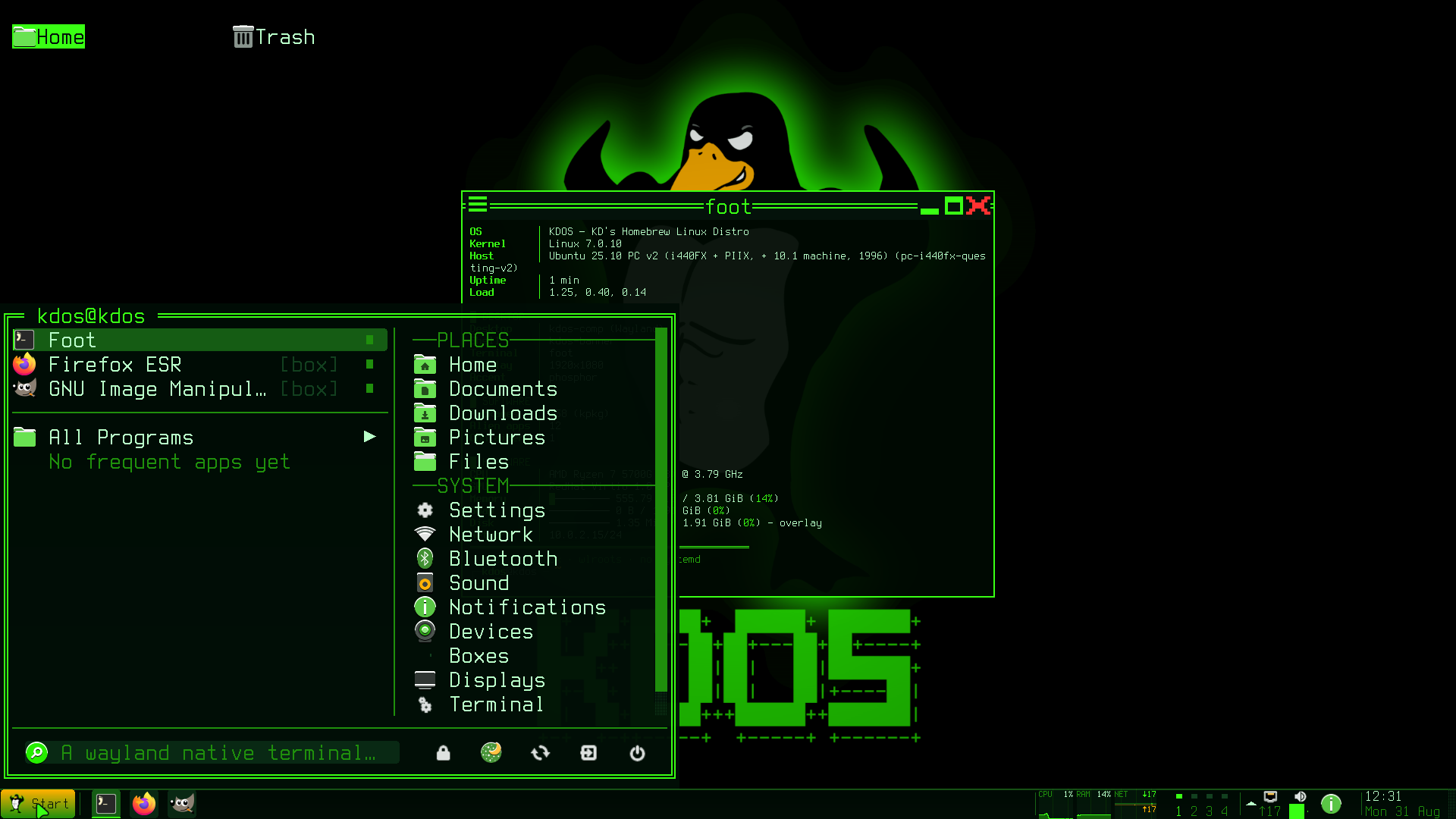
kdos-start is the Start menu, the entry point for somebody using a pointer.
The left column is what you use: pinned entries above the rule, most-frequently-launched below it,
which needs a usage count, kept in the state directory and written atomically. All Programs
opens the category list in place, because a cascade needs a surface per level and buys nothing on a
grid.
A pinned row can carry a launch code: a line id code=XX in ~/.config/kdos/favorites draws the
two letters at the right of that row, and typing both letters (in either case) into an empty search
field opens the row at once, with no arrow keys and no Enter. The check runs when the second
letter lands, so a third letter is an ordinary search. The menu reads the first word of a line as
the identifier and ignores anything after it. All seven shipped favourites carry a code; the file
and the palette’s use of the same codes are in
Configuration.
The menu is three columns from a hundred columns wide and two below it: favourites and
applications, then places and files, then the system group. Under a hundred columns the system
group folds behind one Settings ▸ row and becomes a page of its own with a Back at the top,
because fourteen system rows scrolling inside a sixteen-row body is a list whose end nobody finds.
The menu asks for the wide size and lays out from the width it was given. A surface size is a
request that a server clamps to the work area, so asking for the narrow size and branching on the
request would produce a three-column menu that exists only in a dump. The fold moves the right
column and nothing else: the two application submenus rebuild the left one, and the search walks
the whole array whether a row is folded away or not, so typing bluetooth finds it from either
page. Which system rows stay outside the fold is @toplevel in menu.conf and nowhere in
start.c, so promoting Bluetooth is a line in a file.
The way back is a row, because Escape and the right button are not discoverable and a pointer-only
user is exactly the first-time user of a Start menu. It is the first row of the left column and it
never closes the menu; a search gets the same row as “clear search”.
The field looks like a field: placeholder text, a block caret, sunken, lighting under the pointer,
and going to the accent the moment it is active. A control that looks identical before and after
being clicked is one people click again to find out whether it worked. The clear mark is drawn only
while there is something to clear. With nothing typed, the row under the selection shows the
selected entry’s comment, which every desktop entry carries.
The selected row is a plate, and an accent fill where there is no pixel layer. The plate with its
accent left edge is the desktop’s one selection, from the tone table the taskbar and the cascading
menu share; kch_px_live() is what says whether a recorded pixel op can reach a screen at all,
which needs a backdrop installed, and an offscreen dump never has one. Where it cannot, the row
draws the accent fill with its slots swapped instead. Without that a dumped menu has no visible
cursor, and the cursor is the only thing saying what Enter will do. On a display the plate slides
to the row the selection moves to, across into the other column and stretched to its width when
the selection changes column, in 90 ms; the cascading menu, the window menu and the tray menu
slide theirs the same way. Only the plate moves, so Enter and a click act on the new row at once,
and a scroll that carries the same selection elsewhere puts the plate there without a slide: the
scroll itself glides, each column on its own, the plate travelling with its row (see
Motion). With motion = no the plate lands and
the scroll jumps in the same frame.
Search reaches the fixed rows too. Every one carries synonyms, so typing wifi finds the network
manager, and the hits are appended under a rule. A search over the application index alone would
answer wifi with an empty list on a machine whose network tool is three rows up the same menu.
The routes are searched beside them.
Applications on the installation medium are listed under their category with a medium icon, and
under INSTALL FROM THE MEDIUM in a search. A row means open this: the pack is installed if it
is not, and the application opens. The list is read from the medium’s own index rather than over a
socket, because the search runs on every keystroke.
[box] marks a boxed application, because the first launch of one costs a container start and that
is something a person is entitled to know before clicking. The mark is the shared application
index’s alien flag, set from the entry’s Exec line by the same test kdos-openwith applies to
its candidates, so the Start menu and the Open With dialog cannot disagree about it.
Pinning is done here, at the right edge of a row; the mark is checked before the row’s own action,
or clicking it would launch the application and close the menu under the hand.
The five power and session verbs sit together in one row of icon buttons in the footer: Lock
Screen, Suspend, Restart, Log Off and Shut Down, so every one is reachable with a pointer without
knowing a key or a right-click. The buttons are three cells each and carry no label; with nothing
typed, the search field describes the selection, so hovering a button turns the field into its
name and purpose. They are also reachable from the keyboard, because a search walks the power row
beside the others: typing sleep or reboot finds the verb and Enter runs it. Suspend asks
nothing, because it is the one power action that undoes itself; Restart, Log Off and Shut Down ask
for confirmation first. Lock Screen runs kdos-lock, Suspend, Restart and Shut Down are
kdos-power verbs, and Log Off sends SIGTERM to kdos-comp by exact name, because
kdos-powerd knows nothing about a session.
The category you were last in is preselected. It does not open, which costs nobody a keystroke and
saves one for somebody who lives in Graphics.
kdos-palette and kdos-launcher
Super+Space opens kdos-palette: one input row, one result list, and six sources searched at
once: windows, applications, routes, settings pages, files and chords. kdos-launcher is the same
program showing applications only, on Super+D. Both are drawn as a centred overlay of 78 by 24
cells, and clicking outside it closes it.
The heading order is fixed and is not the ranking. Windows come first, because the cheapest thing
to want is the window you already had; then applications, routes, settings, files, chords. The
score orders the rows inside a heading, so a very good file match never climbs above the window you
were just looking at. A heading with no hits is not drawn, and each kind is capped so one source
cannot crowd out the rest.
Files are searched only after three characters. Every other source is a table already in memory;
the file source forks fd, and doing that per keystroke is a directory walk per keystroke. Its
lines arrive over several frames and are merged into the list as they come.
A chord row shows the chord and does not press it. Enter runs a chord’s program where the chord
runs one, and otherwise the row says which keys to press. A client cannot fire the session’s own
actions and must not be able to: synthesised input over the surface socket is a way to drive
somebody’s desktop for anything that can reach it, which is the rule the protocol is shaped around.
The row is still worth having: “what was the chord for tiling” is asked far more often than a
chord is rebound.
A row is named by what it does, which is not the action field. The action names are those of
labwc, the compositor kdos-comp is forked from, so nearly every row would be the
word Execute; those rows are named by the command they run instead.
Super+Space opens this and not the root menu. A pointer wants rows and a keyboard wants a search,
so the taskbar’s Start button and the right button on the desktop still open menus. The second
step of kdos-keys’ first-run tour, “search for anything”, shows whichever chord
binds the palette, and selftest.sh fails when the shipped rc.xml leaves any of the tour’s four
steps unbound.
kdos-menu draws the Applications, Places and System menus, and the taskbar’s window menu.
The compositor’s root-menu file, ~/.config/kdos-comp/menu.xml (copied from /etc/skel), lists no
applications. The compositor’s built-in default is a compositor’s menu rather than a desktop’s, and
an application menu built at compositor startup would be the one that went stale. Applications,
Places and System are this program, reading the same entries the launcher and the panel do.
The taskbar’s window menu carries Restore, Minimize, Maximize and Fullscreen; then New Window when
the window’s app_id resolves to a desktop entry; the application’s recent files when it has any;
Pin to taskbar or Unpin from taskbar, again only for a resolved entry; and Close. For a group of
more than one window it adds Minimize all (n), Restore all (n) and Close all (n) under Close,
above the window titles. It reads the window’s own state, so Maximize says Restore Down when the
window is maximised and Fullscreen says Leave Fullscreen when it is fullscreen, rather than being
toggles whose direction nobody can see, and Restore all is drawn only when some of the group is
minimised, counting those. A row that is always there and does nothing most of the time teaches
people to stop reading the menu.
--windows APP_ID is the member list a left click on a grouped window button opens. It has one
row per window, titled by the window’s title or, without one, its app_id. A minimised window is
marked with a dot, not hidden, because the list is how you get it back, and the focused one
is marked with a square. Under a rule come Close all, Minimize all, and Restore all (n) when
some of the group is minimised.
This is a taskbar row’s menu, not a frame’s, and the two are different lists. This one is per
application and carries the verbs for a whole group of windows; the frame’s own menu, on
Alt+Space or a right press on a title row, is per window and carries every verb that frame has.
The window menu waits for the application’s own windows before deciding it has none. A compositor
announces its toplevels inside the connect call, but a server that answers later leaves a list read
at once empty whatever is on screen. The menu reads until a window carrying the app_id it was given
arrives, or half a second passes; waiting for any window would end the wait on somebody else’s row
and leave the menu with nothing to draw. After that it prints kdos-menu: no windows for <app_id>
and exits without drawing. That message and this display server does not offer a window list are
different answers on purpose: the second is asked of the display backend rather than of a count,
because a count of zero is also an ordinary empty desktop.
Move and Size are deliberately absent: the protocol the panel uses has no request for either, and a
menu row that did nothing would be worse than the title-bar drag that is the move.
The menu is titled with the box qualification when there is one, so it says the same words the
taskbar button did.
kdos-desk
The desktop, its icons, and its own context menu. It is a background layer surface with on-demand
keyboard, started per output by the compositor.
It claims the whole surface. Claiming only the cells its icons occupy lets a click on bare
wallpaper reach the compositor’s root menu, at the cost of the desktop having no menu of its own,
so creating a folder would be reachable only by right-clicking an existing icon, and on a fresh
login the only icons are two pinned places.
So the desktop answers its own wallpaper: New Folder, New File, Sort Icons, Refresh, plus
Applications, Change Wallpaper, Display Settings and Settings, and the verbs that act on the whole
desktop: Show Desktop, Screenshot and Lock Screen. The desktop’s own right press is where a root
menu has always been, and this is the surface that owns it, so a verb a chord runs is a row here
too, carrying the same command the chord does. It is a management request, so this surface asks for
manage: it is the session’s own chrome, started beside the panel by the compositor, which is the
line that privilege is drawn on.
A verb reaches the table only where the machine can answer it, and desk_verb() is the one place
that knows how each is answered. Show Desktop is ToggleShowDesktop on the compositor’s command
socket, Lock Screen spawns kdos-lock, and Screenshot spawns kdos-shot screen, the command
rc.xml binds to Print, so the row and the key take one screenshot in one way. A row for
anything the compositor has no action and no program for would be a menu row that does nothing,
which misstates what the machine can do.
Beside the wallpaper rows, an icon’s own menu adds Rename, and the Trash icon adds Empty Trash.
Refresh re-reads ~/Desktop, and Sort Icons cycles the order the grid is sorted in.
The file verbs come from libkxdg’s table, the same one kdos-pick and mc’s F2 read, so a
verb appears on all three at once. A rule follows, then the rows above, which only a desktop can
answer. The rule is drawn only when both halves have something.
On bare wallpaper the shared half is masked to the verbs that mean here: Open Terminal Here, Find
Here, Add to Places, Git Status Here. Open, Share and Move to Trash read as acting on the thing,
and on the wallpaper there is none: a Move to Trash there would act on ~/Desktop itself.
Two shared rows keep a local action, and the row stays the table’s. Open goes through the
desktop’s own opener, because a .desktop icon is an application to run rather than a file to open
and the Trash icon is a place; handing either to the MIME chain would make the menu row mean
something different from Enter on the same icon. An icon that is a .desktop file runs through
sh_launch() with the Terminal, X-KDOS-Term, X-KDOS-Float and X-KDOS-Size keys this
surface parsed, the same call the Start menu makes, so an icon and a menu row for one entry
cannot open two different windows, and a boxed application dropped on the desktop reaches the
session rather than being forked beside it. Everything that is not a .desktop icon goes to
kdos-appbox open. Move to Trash asks first and refuses the two pinned places: `kdos trash
` confirms nothing, which is right for a prompt and for `mc` and wrong for the row sitting
beside `Delete` on this surface.
The context menu is drawn into its own grid, since this surface owns the screen and a popup here is
not a second surface. Its local rows carry a scope (icon, wallpaper, or both) because two menus
would be two places for New Folder to drift.
### Selection and the keyboard
Nothing is selected until something selects it. The desktop opens with no highlight. `Escape` puts
the highlight down from any icon (this is the `Deselect` rung on the Esc ladder), and a
press on bare wallpaper does the same, because the menu that opens there acts on the folder and a
highlight left on a file names something none of its rows touches.
An arrow, `Tab` or `Shift+Tab` on a desktop with nothing selected selects the first icon and steps
no further: a keystroke that reached for the grid and stepped inside it lands on an icon nobody
aimed at. The ends of the grid stop rather than wrap, because a grid is a surface and a jump from
the last icon to the first is the width of the screen for a key that means one cell. `Home` and
`End` name a cell rather than a step, so `End` with nothing selected means the last icon.
The hint row is drawn only while the desktop holds the keyboard. This is a background layer with
on-demand keyboard: the compositor gives it the focus on a press on the icon layer and takes it
back on the next press on a window, so between boot and the first click the arrows, `Enter`, `Del`
and `Shift+F10` are not answered and are therefore not named. `Enter open` and `Del trash` are
named only where there is a selection to act on, and `Arrows select` takes their place where there
is not.
The name editor is left by Escape and by a click, and its entrance is the pointer. New Folder, New
File and Rename put a line editor on the status row, and the menu that opens them is reached with
the right button, so a state a pointer can enter must be one a pointer can leave. A click abandons
the half-typed name rather than applying it, and the press is then handled like any other, because
a click that visibly did nothing is how a person concludes the desktop has stopped answering.
Escape is the Cancel rung of the window contract's own ladder, so there is one cancel and not two.
Without the click, an editor opened by the pointer swallows every pointer event over the whole
desktop, and on a display that gives this surface no keyboard, that is a state with no exit at
all.
`~/Desktop` is created if it is missing.
### The wallpaper
`kdos-desk` paints no ground of its own. The wallpaper is a PNG the compositor draws and this
surface is transparent over it, so anything painted here would be a rectangle of opaque cells on
somebody's photograph. What it draws is the icons, their labels and the selection, and nothing
behind them.
Transparency has to be asked for. `libkcell` paints every cell including its background
slot, and the ordinary shm buffer is `XRGB8888`, which carries no alpha, so whatever `KT_BG` is,
it would land opaque and the wallpaper would disappear the moment `kdos-desk` started. The
background role therefore asks `libkwl` for an ARGB surface and turns on `libkcell`'s
transparent-`KT_BG` mode: every cell the desktop does not write is cleared to zero and the
compositor's wallpaper shows through, and a cell that does carry something (an icon glyph, a
label, the selection bar) is painted normally.
Which image, how it is cut and whether there is one at all are `wallpaper` in `comp.conf` and the
compositor's business; see [kdos-comp](/docs/kdos/04-programs/kdos-comp.html#the-wallpaper). Icon labels stay readable over
a photograph because they paint their own `KT_BG` rather than letting the ground show through.
## kdos-pick
The file chooser, and with a browse flag the file manager. This is the dialog every boxed
application reaches through the portal, and so does a native GTK application on the host, because
`/etc/profile.d/10-wayland.sh` exports `GTK_USE_PORTAL=1`. That makes it the one surface on the
system that other people's software puts in front of you.
As a browser, opening a file hands it to the system's open resolution and the dialog stays up: a
browser that closed after one file would be a chooser under another name.
The preview pane parses P6 and nothing else, and everything else becomes one. `kdos thumb --ppm`
owns the decoders, and the helper forks and hands back a small picture. That is what lets the
chooser show a photograph, a PDF's first page or a frame of a video without linking an image
library into a dialog that has to build on a bare host. The fork is synchronous and runs in the
dialog's idle slot, so a slow helper stalls the dialog for as long as it runs.
`Shift+F10` and the right button on a row open the file verbs: the same table `libkxdg` gives the
desktop and `mc`'s `F2`, so the same file offers the same things wherever you meet it. A verb whose
program is not on the machine is not offered, which is why the list is shorter than the table. On
the empty space below the list the right button means *up* to the parent directory, the
convention of the two-pane file managers `mc` follows.
The hint row does not name `Shift+F10`, and that is the width: this dialog's row is thirty-eight
cells and a fourth hint would take the `Esc` one with it. The menu is the one verb here with a
pointer path, and the person in front of this dialog is usually holding a mouse.
Places is a list on `Ctrl+P`, not a third column, and the width is the reason. The dialog
is sixty-four columns and already spends its right-hand column on the preview; a third column
leaves a file's name about thirty cells, and a chooser that cannot show a name is not a chooser.
The list opens over the file list as the outer of the dialog's two Esc rungs, with the line editor
over it.
The portal's dialog is this dialog, at this width, and it is not widened for boxed applications: the
smallest screen this desktop is drawn for is eighty columns, a sidebar that could be read is about
sixteen more than sixty-four, and a chooser needing all eighty would have no frame, no ground and
nowhere for the bar. Two dialogs at two widths would also be two layouts and two sets of reference
frames. See [Decisions](/docs/kdos/01-philosophy/decisions.html#one-file-chooser-at-one-width).
An archive opens two ways, and they are different questions. `mc` mounts a tar, a cpio, a zip or an
`ar` as a directory through its own VFS, which is the right answer when you want one file out of
one and a view no MIME type expresses. Everything its VFS cannot reach on this image goes to
`kdos-openarchive`, which extracts beside the file. Only 7z and rar get a row: that is the
intersection of what `ouch` reads and what shared-mime-info can name, and a row for a type the
image cannot produce is one nobody can tell is dead.
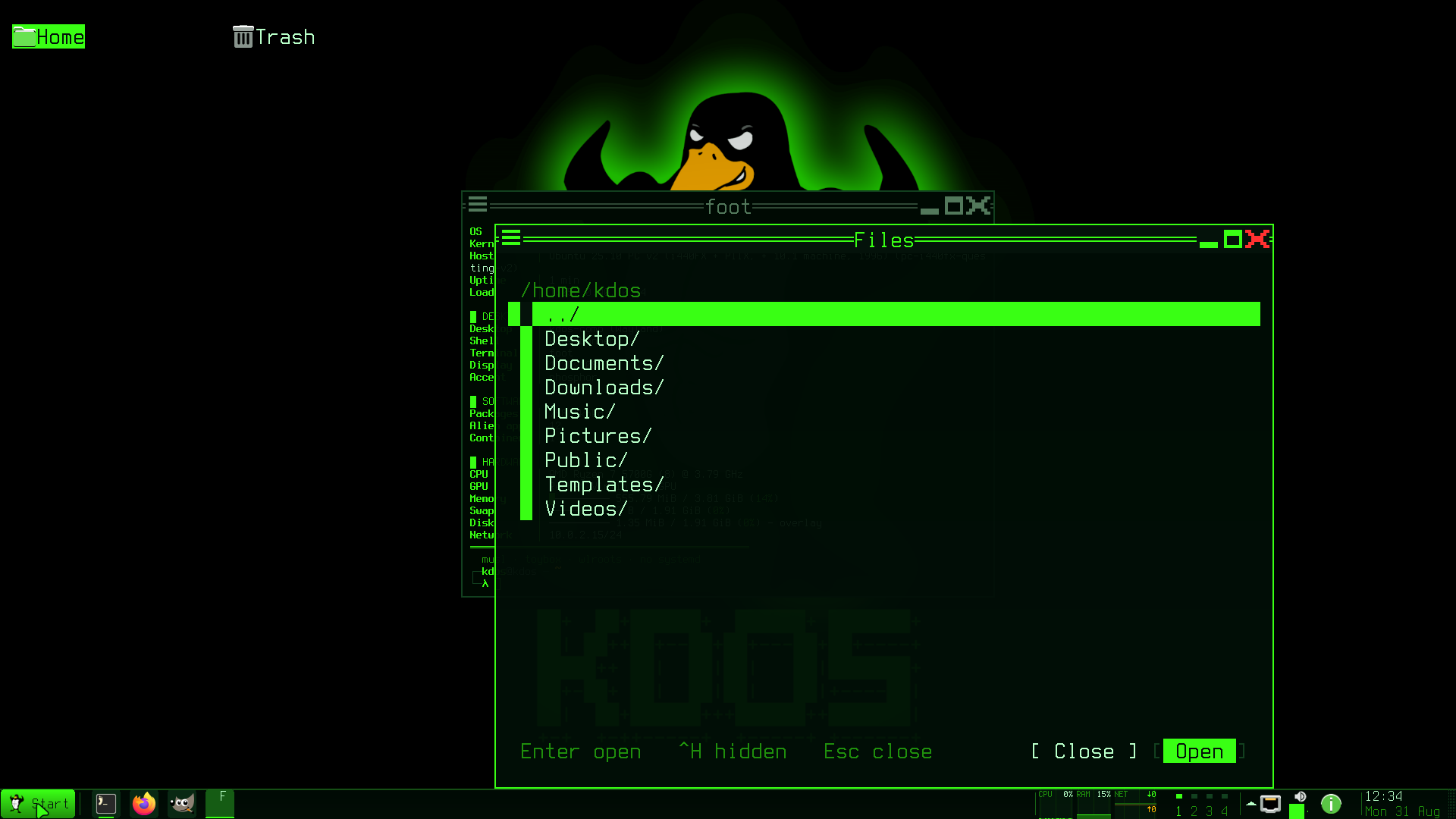
## kdos-settings
The control centre. It opens on a grid of labelled pictures rather than a sidebar of words, because
a sidebar is a fine way to move between pages once you know what is on them and a poor way to find
anything the first time.
Escape steps back to the grid rather than out of the program, so the unsaved-changes guard stays at
the single exit. `--page NAME` lands directly on a page (`appearance`, `panel`, `desktop`,
`hardware`, `session`, `input`, `apps`, `boxes` or `system`, in any case; any other name prints
`kdos-settings: no page named ''` and exits 2), because an applet deep-linking into a page and
then making you pick it again would be a link that does half its job. `kdos settings [page]` opens
it from a prompt and passes the page word through unchecked: `kdos-settings` owns the list of page
names, and a second copy in the command would be a second list to keep in step.
Nine categories:
| Category | Holds |
|---|---|
| Appearance | Accent, the [phosphor pass](/docs/kdos/04-programs/kdos-comp.html#the-phosphor-pass) (the compositor's CRT-style shader over the desktop), wallpaper, chrome font |
| Panel | The taskbar and tray |
| Desktop | Icons and workspaces |
| Hardware | Screens, network, sound |
| Session | Idle, lock and power |
| Input | Keyboard and pointer |
| Apps | Which application opens what: a fixed row per role (web browser, web page, mail, folder, text, PDF, document, image, video, music, archive), then every type you have set a default for. Each row names the handler `kdos-appbox open` would start and the layer that answered — *your default*, *your addition*, *KDOS default* (the shipped `/etc/xdg` tables) or *installed* (an entry's own MIME types) — through the same `kxdg_handlers()` lookup, so a fresh system shows its shipped defaults. Enter opens the Open With chooser for that row's type, which writes your choice; the page re-reads the tables whenever it is idle, so the change shows without reopening it |
| Boxes | Environments and packs |
| System | The machine itself |
System is a list of ten rows that each open another program: *Resources…* (`kdos-res`),
*Power…* (`kdos-energy`), *Disks…*, *Printers…*, *Accounts…*, *Date and time…* and *Sync…* under
"The machine", then *Firewall…*, *Updates…* and *Backup…* under "Security and updates". Without
them those programs are reachable only from their own chords and routes, and from nowhere a
person looking for a control centre would go. *Sync…* is described as calendar and address-book
synchronisation through vdirsyncer, but the program it opens is `kdos-connect`, the SMB share
form. A closing note says what is not here, namely the service list and the root-owned files
(`/etc/kdos/zram.conf`, `packd.conf`, the timers) that are edited directly, rather than
implying that the machine is not reachable from here.
The tile icon names are checked against the shipped icon set rather than taken from the naming
specification, and the blurbs are cut to what a tile holds at eighty columns.
### Every value is a control
A number is a `ktui_slider`: press the track, drag it, roll the wheel over it, or click an end cap
for one step. A choice is a `ktui_dropdown`, which opens under the row and picks on a click.
From the keyboard, Left and Right step a number by its step (held to its range) or move a choice to
the previous or next option. Enter moves a choice on to its next option, and opens a number for
typing; a second Enter commits what was typed. While a dropdown is open, Up, Down, Home and End
move through it and Enter or Space picks.
The control answers the first press, not the second. A row is selected and its slider is set by one
gesture; a slider that needed the row selecting first would be two movements for one. The drag
belongs to the press that began it, so the pointer may leave the column and go on setting the
value, and the wheel turns the control it is over and scrolls the page everywhere else. An open
dropdown owns the pointer and the keyboard while it is down, because it is drawn over the rows
beneath it and a press tested against those rows would pick whatever the list is covering.
A text value is the toolkit's own field, a `KtuiField` the loop hands its keys and presses to. A
press inside the field places the caret, and a press anywhere else leaves the edit open with what
was typed, because clicking away from a field is not how anybody means to discard it.
The volume control is a slider. A progress bar drawn where a control belongs is a control the
pointer cannot find, and this is the one surface a person opens because they want to change the
number. A muted device draws at zero and says `mute` beside it; its real level is still there and
comes back with the mute, because a track showing a level while the machine is silent would be the
control disagreeing with the speaker.
The wheel scrolls every table, through `ktui_table_event`: the wheel scrolls, a press moves the
caret, a press on the row it is already on picks, and the right button is Back. That is the same
rule `ktui_rows_event` gives a list, and one function's rule instead of a copy per surface.
`kch_scrollbar` takes an id precisely so that the bar which was drawn is the thing a press is
measured against.
### Reading a form
Its two panes each carry a caret and only one carries a plate. The category column and the field
list are drawn through `ktui_sel_row()`, which fills the row of the pane holding the keyboard and
marks the other's with `►` alone. Two filled panes, the focused one in the accent and the cold one
in `KT_DIM` (about 1.6:1 against the page), would give a form of eight numbered rows eight
accent-coloured slider tracks and one lit full-width bar following the pointer, with no hierarchy
in it to read.
The scope tag and the value column lift off the muted colour when their row is selected. `live` and
`login` are the answer to *did that do anything*, and a selected row is exactly when somebody is
asking, but muted on the selection fill measures 2.44:1 to 3.38:1 depending on the accent (see
[The design language](/docs/kdos/03-architecture/design-language.html#a-selected-row-is-kt_dim-under-kt_text-and-the-accent-is-one-cell)),
so left alone the right-hand half of the row would disappear at the moment it matters. `ktui_sel_dim()` is
that question asked in one place. `KT_DIM` survives in one role only, and off the fill: an
`(unset)` value, where it carries the distinction and is not meant to be read.
Every page is cut into sections. A page of forty knobs reads as one undifferentiated list, and the
store a row writes (the compositor's file, the panel's, the monitor's) is exactly what a person
needs to know before changing one. A section rule says it once for the rows under it, and the caret
steps over a rule in whichever direction it was travelling: a heading that could be selected is a
row where Enter, Left and Right all do nothing, which is the shape of a control that is broken.
The pending counter and the quit guard count every store. A counter that asked `comp.conf` alone
would show `0 pending` for a change to the panel's file or the monitor's, and a single Escape would
discard it with the guard saying nothing.
### What the pages do not do
The Appearance page does not list the accents. Its `Accent…` row opens `kdos-style`, which draws
every scheme in its own colours and previews it live; a row of names beside it would be a second
way to choose one, and the worse of the two.
The Input page is notes and one way in. The pointer and the keyboard are both the compositor's, and
both are `rc.xml`'s rather than this page's: the layout comes from `/etc/keymap` by way of
`kdos-desktop`, and a row that wrote a file no program opens is exactly the "change a thing, see
nothing" this window promises not to be. `Keyboard shortcuts…` opens the card.
The Boxes page is the configuration half of box management; the runtime half is `kdos-box` and the
monitor's Boxes page. It never writes a profile. It reads them, and writes by running `kdos-box`,
which is the writer a person at a prompt reaches. That is what makes "a box created here is
identical to one created by hand with the same answers" true rather than approximately true, and it
keeps the three things `kdos-box` knows and this page must not re-derive: which keys the container
engine can enforce, which it cannot, and that a namespace change needs the box recreating.
Only the keys that changed are passed, because the writer rewrites the file from what it loaded and
passing everything would also rewrite the keys this page does not show. A box a launch created is
always a row, profile or not, because an application pack gets a box at first launch and nobody ever
describes it. Such a row reads *no profile yet* rather than showing defaults as though
somebody chose them. The name is editable only while creating, since renaming is an operation with
no verb, and the network warning for a registry base is a row rather than a footnote.
### What it writes
All files are in `~/.config/kdos/` (or `$XDG_CONFIG_HOME/kdos/`). Nothing is written until you
apply; the footer then says how many changes took effect now and how many wait for the next login.
If a file cannot be written, the footer says `could not write N file(s) — nothing else changed`
and the changes stay pending. Every file is written through a temporary file, `fsync` and
`rename`, so a crash mid-write leaves the old file intact instead of half of the new one.
| File | Applied |
|---|---|
| `comp.conf` | `SIGHUP` to `kdos-comp`; each key applies on reload or at the next login per the [compositor's own split](/docs/kdos/04-programs/kdos-comp.html#configuration) |
| `panel.conf` | `SIGHUP` to `kdos-shell`: the bar on screen re-reads it |
| `res.conf` | `SIGHUP` to `kdos-res`, which re-reads it |
| `term.conf` | `SIGHUP` to `kdos-term`. An open window applies the accent, `paste_guard`, `image_cells` and `images = no`; the other keys apply to windows opened afterwards, and a window whose font was stepped keeps its stepped size. See [kdos-term](/docs/kdos/04-programs/kdos-term.html#changing-it-while-windows-are-open) |
| `launcher.conf` | No signal. Its one key, `files`, is written here and read by no program: see [known gaps](/docs/kdos/06-reference/known-gaps.html) |
| The user's `menu.conf` | No signal: the Start menu reads it when it comes up |
In `menu.conf` this page owns one `@` setting and no route at all. Every other line is copied
through byte for byte, which is what makes writing into a route table safe.
Each signal is sent with an exact name match (`pkill -x`), so it reaches only the process whose
name is exactly the one given. A pattern match on `kdos-res` would also reach the setuid
`kdos-resctl`, which handles no signals and would be killed by the `SIGHUP`.
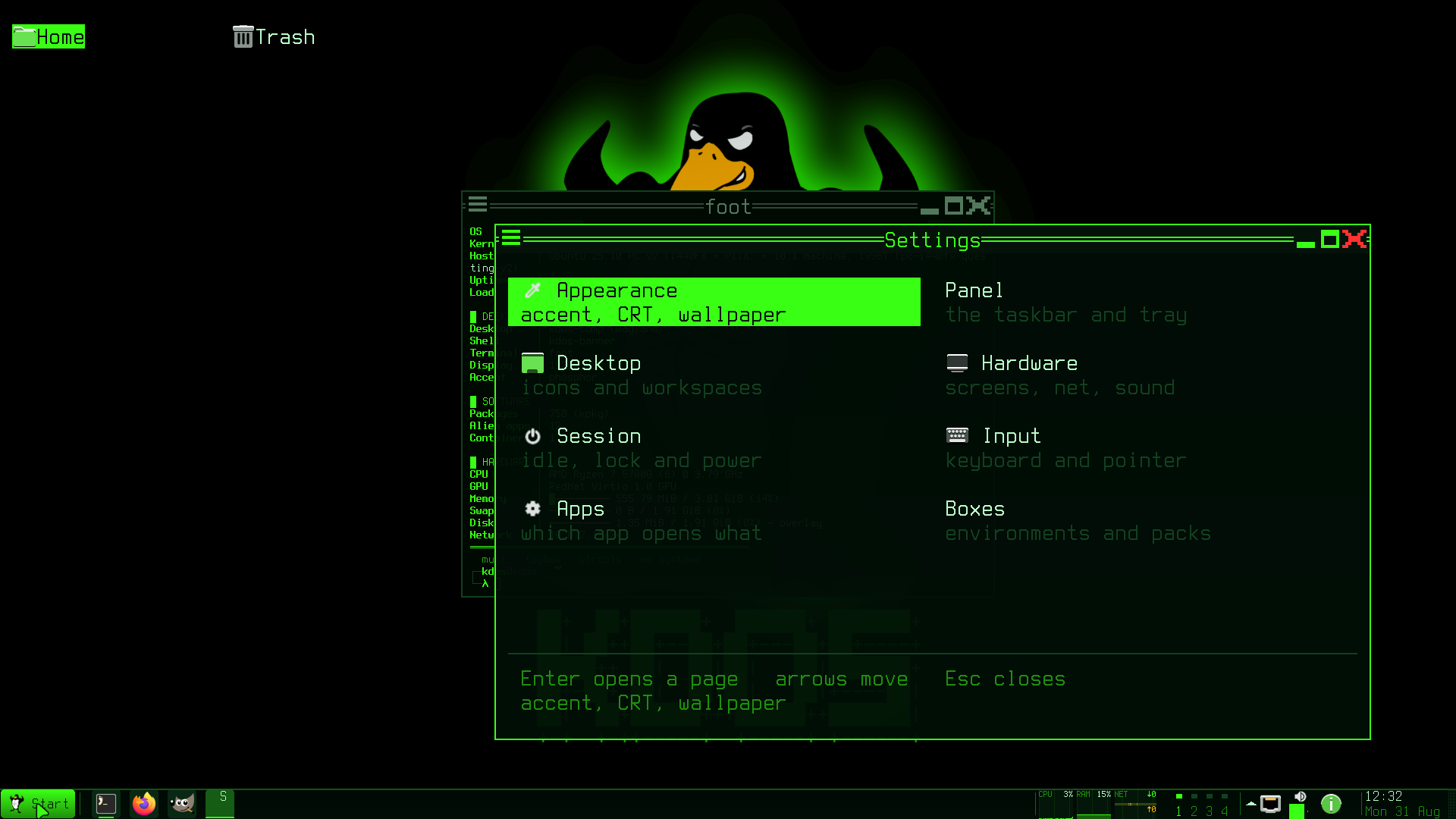
## The device managers
The surfaces in this section are windows over services that also work from a terminal:
NetworkManager, BlueZ, ALSA and PipeWire, `kdos-mountd`, CUPS. `kdos-net`, `kdos-bt`, `kdos-audio`, `kdos-disks` and `kdos-print`
share their chrome from `libkchrome`, and with it three things every classic control panel has:
- A header band: accent-filled, two rows, an icon and a subject line saying what its subject is
doing right now. "Am I connected" is the question the window is opened to answer.
- Group headings where a list has groups, so eight rows read as two groups.
- Real buttons, labelled with verbs, clickable, each enabled from the selection. A Connect that
fails when pressed teaches people to stop trusting the row it was on.
`kdos-devices` and `kdos-connect` use their own layout and draw no header band. `kdos-devices` has
its own sections and a hint row rather than a header band, group headings and a button bar;
`kdos-connect` draws the shared buttons under a layout of its own.
Each of these opens either as a popup anchored to the panel or as a centred window, depending on
what opened it. From the panel it is the bar's own popup, sized like one and dismissed by a click
elsewhere; typed by name or opened from the Start menu it is the application, centred, full size
and staying up, because somebody who went looking for the network tool will look at something else
in the middle of using it, and a pairing confirmation must not vanish because the pointer went to
the device on the desk. One flag decides both: `--at-bottom X Y`, which the panel passes with the
pixel position of the applet that was clicked. `kdos-net`, `kdos-bt`, `kdos-audio` and
`kdos-devices` all accept it, so a script can open any of them as a popup (for example
`kdos-net --at-bottom 1600 1040`), and without it each opens as a centred window.
### kdos-net
`kdos-net` talks to NetworkManager over the system bus.
The list does not reorder under the pointer. Signal strength moves on its own, so the list is
sorted once per refresh and the selection follows a kind-qualified key rather than the row index:
an SSID for an access point and an object path for a saved profile, because a VPN may be named the
same as a network.
The passphrase typed here is written into the profile as it is created. Every later question
belongs to `kdos-netagent`, because the service raises a secret request against its registered
agents rather than against whichever program started the activation.
Saved VPN and WireGuard profiles are rows too, at the left margin under the radios, because they
belong to no radio. Enter is a toggle, not a join, since the service refuses to re-activate
something already active. A profile's type is not a property of its connection object (only
Unsaved, Flags and Filename are), so it comes from one `GetSettings` per path, cached, and a row
appears the moment that answer lands. The window lists and toggles them; it does not create one.
`h` shares the machine's network over its own radio, where the radio reports the access-point
capability. That is `ipv4.method = shared`, which starts a DHCP and DNS server on the access
point's interface and installs a NAT table of its own, so `/etc/nftables.conf` leaves forwarding
and those two ports open for the shared subnet. A change made through `kdos-firewall` while a
hotspot is up leaves its NAT in place: applying a rule change reloads the whole file, which
replaces only the firewall's own `inet filter` table, so the hotspot's `nm-shared-*` table and
rootful podman's `inet netavark` table survive the reload.
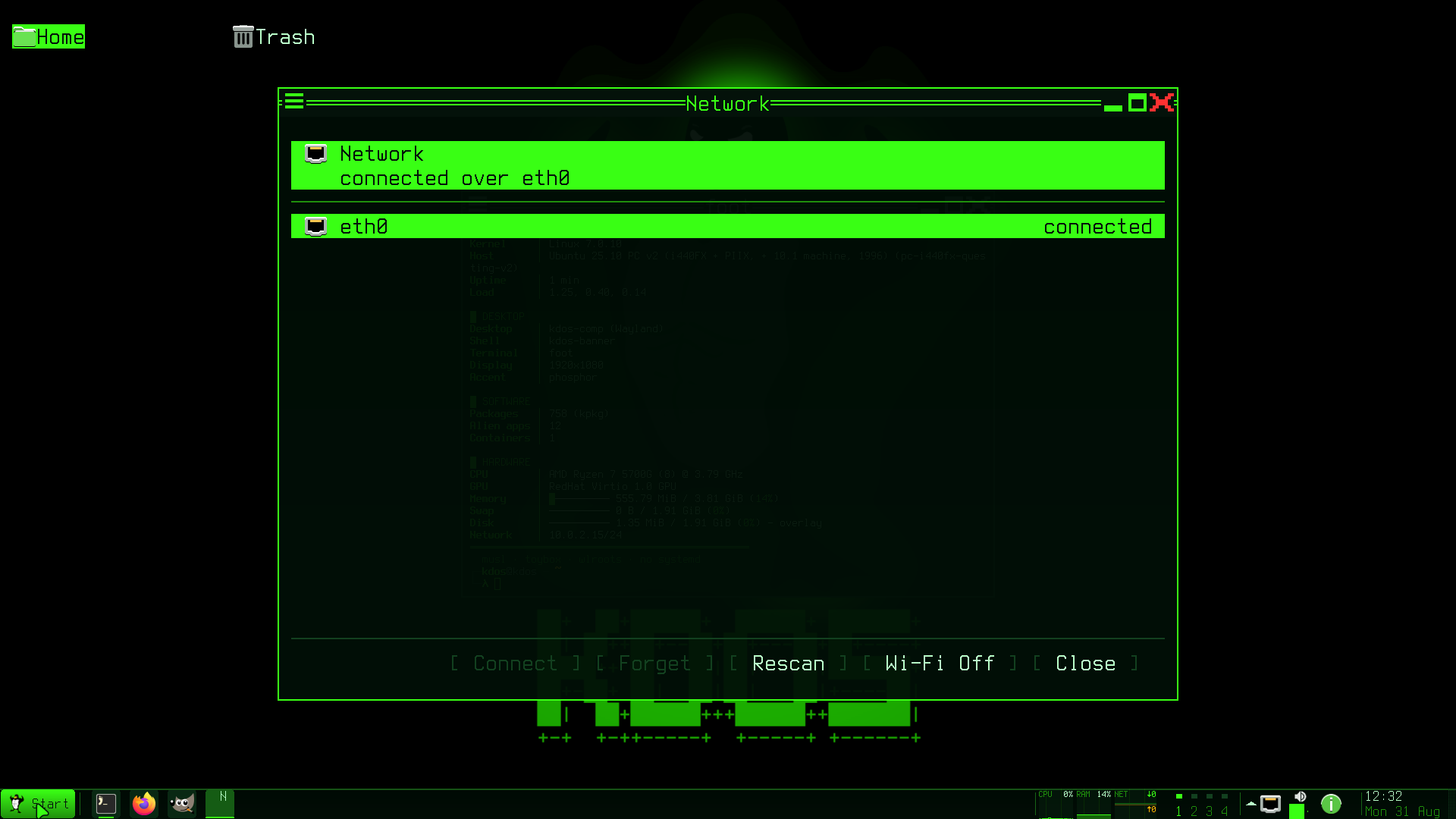
### kdos-netagent
`kdos-netagent` is not a window that opens from the panel. It starts with the session, holds no
display while idle, and raises one dialog when NetworkManager asks it for a secret. Without it the
service fails such an activation in silence, because it never prompts on its own.
The reply is deferred the way `kdos-bt`'s is. The box is a toplevel rather than a layer surface,
because the compositor focuses a toplevel when it maps and focuses an on-demand layer surface only
when it is pressed, and a passphrase field that swallowed the first keystrokes would be worse than
none. It stores nothing, so a request without the interaction flag, which is the service polling its
agents for saved secrets, is answered at once rather than with a dialog.
### kdos-bt
`kdos-bt` registers a pairing agent, without which a keyboard cannot be paired at all: the service
asks the agent to confirm a passkey and refuses the pairing when nobody answers. The confirmation
is a deferred reply (the handler retains the message and returns without replying), because a
handler that sat in its own loop would stop answering the service.
What a headset actually sounds like is WirePlumber's decision, not this surface's. The profile a
device negotiates (A2DP for music, HFP for a call) and the codec inside it belong to the session
manager; `kdos-bt` pairs, trusts and connects, and the audio graph is
[PipeWire's](/docs/kdos/03-architecture/session.html#audio). The `pipewire` port enables the AAC, aptX, LDAC,
LC3, Opus and G.722 codecs in the bluez5 plugin beside the built-in SBC, FastStream and HFP codecs,
so a device gets what it asks for rather than the lowest-quality codec the specification
mandates.
### kdos-audio
`kdos-audio`, on `Super+F3`, answers the questions the panel's volume applet cannot: which device
the sound is coming out of, why it is the wrong one, and how to get the headphones connected. It
has two panes, moved between with `Tab`.
| Pane | Lists | Keys |
|---|---|---|
| Outputs | Every ALSA card, with its volume, and every PipeWire sink when a PipeWire graph is reachable | `Enter` makes the row the default, `Left`/`Right` change its volume by 5%, `m` mutes it |
| Bluetooth | Paired and discovered devices, with their state | `Enter` connects or disconnects, `p` pairs, `s` starts or stops a scan |
ALSA is the base layer and PipeWire is optional. The card list is always there, so the window can
still switch outputs when PipeWire is what has gone wrong.
Making a row the default means two different things:
- **A PipeWire sink row** switches the session's default sink through `wpctl`, which moves what is
playing now. Without `wpctl` on `$PATH` the window says so rather than pretending.
- **A card row** writes `defaults.pcm.card` and `defaults.ctl.card` into `~/.asoundrc`. That steers
programs that open the card directly. It does not move this session's sound, because the ALSA
`default` device on KDOS is the sound server (unless `$KDOS_ALSA_DEFAULT` names another PCM from
`/etc/alsa/conf.d/99-kdos-pipewire.conf`), and the status line says exactly that.
Every Bluetooth call is asynchronous. Pairing a headset can take ten to thirty seconds, and the
window keeps drawing throughout; the result arrives as the next refresh's device state. Pairing a
keyboard, and the passkey confirmation it needs, is [`kdos-bt`](#kdos-bt)'s job.
### kdos-devices
`kdos-devices` enumerates cameras by device call rather than through a library, finds who is
holding one by walking the process table, and previews a grabbed frame through the shape-matching
character renderer. Opening a camera to preview it is using it, so the privacy lamp lights for this
program too and the descriptor is closed with the frame.
Its scanner section is `scanimage -L` and not `libsane`. Linking the library would pull every
backend's shared object and its configuration into the process to ask a question `scanimage`
already answers, and the scanning is `scanimage` too. The probe walks a USB bus and the network, so
it runs once per refresh and never on a keystroke.
Its microphone list is `kpr_sound_pcms()` filtered to the PCMs that carry a capture stream.
`kdos-rec` reads the same function, because two surfaces must not give two answers to what a
microphone is, and a list built from `/proc/asound/cards` offers an HDMI codec as an input.
It also fronts removable media, and it notices an application set on a stick: a `.ktar` on a
mounted removable filesystem gets a row under `APPLICATION SETS ON A STICK`, and Enter imports it
offline, with every pack verified where it mounts. That is the only route to software on a machine
with no network. It reads one directory per already-mounted filesystem rather than scanning the
machine, because the surface is waiting for a keystroke and a scan would not fit on a panel tick.
The list scrolls through `ktui_table`, because the sections are as long as the machine's devices.
The section captions are non-selectable headings: every verb here acts on a device, so the
selection steps over them rather than landing where nothing would happen.
### kdos-disks
`kdos-disks` is the surface for the `kdos-mountd` verbs: `mount`, `unmount`, `unlock`, `close`,
`format`, `smart` and `write`. Ejecting is offered by the removable-media toast (`kdos-mediad`)
rather than here.
Every privileged operation is a daemon verb and this program runs as the user. It opens no block
device, forks no `mkfs` and holds no capability; what it does is draw a list the daemon published
and send back a row number, and for an image write, the image, opened as the user and handed to the
daemon as an open descriptor. A disks window that needed root would be a setuid binary with a text
editor's attack surface.
Partitioning is `cfdisk` in a terminal and is not reimplemented. A partition editor is a program in
its own right, `cfdisk` is on the image and is what somebody who partitions disks already knows, and
it is pointed at the row's whole disk, because a partition editor aimed at `/dev/sdb1` opens the
table inside a filesystem, which it reads as an empty disk and offers to write.
There is no `fsck`. On a mounted volume it corrupts; on an unmounted one it takes minutes with no
progress anybody can read; and a button that started one and could not be stopped would be the most
dangerous control on this desktop. It belongs in a shell, run by somebody who has unmounted the
volume first.
Erase asks for the device's own name to be typed, which is the daemon's rule rather than this
surface's decoration.
**Write image** (`w`) puts a disk image over the whole disk the selected row is on. It asks for the
image first (type a path, or drop the file on the window, which opens the prompt with the path
filled in), checks that it is a file, and then asks for the disk's name: `sdb` for a row on `sdb1`,
because the disk, partition table and all, is what is replaced. The daemon's worker reports as it
goes, and the prompt row becomes a bar reading `writing of ` and then
`verifying of `; the window keeps drawing and may be closed without stopping the
write. The end is `written: sdb verified` or `not written:` and the daemon's reason. The
verb is refused unless `/etc/kdos/mountd.conf` says `write = yes`; every refusal is in
[the daemons](/docs/kdos/04-programs/daemons.html#writing-an-image).
### kdos-connect
`kdos-connect` is the same shape for a folder on another machine: five fields (server, share,
user, domain, password) handed to `kdos-mountd`'s `cifs` verb, with a list of what is mounted
underneath.
The password is a second frame and never a token, for the reason the passphrase in `kdos-disks` is:
the request line is split on spaces. The four names are not checked here, they are checked in the
daemon. `mount.cifs` builds its option string by concatenation and escapes nothing but the
password, so the allowlist that refuses a comma has to be the daemon's, because a check in a
surface is a check nothing else talking to the socket gets.
A Kerberos share needs no password at all. *Sign in* chooses between a password and the ticket
`kinit` has already put in the credential cache; with the ticket, the password row is not asked
for, because nothing about a ticket crosses the daemon's socket: the kernel fetches it through
`cifs.upcall`, which reads the cache directly. It is a separate daemon verb rather than an empty
password, so a surface cannot ask for a Kerberos mount by accident.
*Browse* (or `--browse` on the command line) lists the machines that answered an mDNS and a
NetBIOS broadcast at the moment it was pressed. There is no browse master on the image to ask, so
the list is a snapshot: machines come and go from it, and an empty list means nothing answered,
not that the verb failed. The broadcast blocks, so the frame saying it is running is drawn before
the call rather than after it. The list of mounted shares is re-read from `/proc/mounts` after
every verb, because a row number is only true of the list it came with.
While the form is open it takes every key before the window's shared key handling (the
[key contract](#the-key-contract) every surface answers), and `Esc` returns from the form to the
list, clearing the password. A text field that sat behind the shared handling would close the
window the first time somebody typed a letter that handling gives a meaning to.
### kdos-print
`kdos-print` drives `lpstat`, `lpinfo` and `lpadmin`, not libcups and not IPP directly. Those
three are on the image, they are what the CUPS documentation tells a person to type, and they are
the interface upstream keeps stable; linking libcups would put a second client library and its
configuration parsing in the panel binary to re-derive answers three programs beside it already
give.
It runs as the user, because `/etc/group` grants the desktop user `lpadmin`, the authority CUPS
itself defines. That is the difference between printing and mounting: CUPS shipped the privilege
split and the kernel did not, so printing needs no daemon of ours in front of it.
Discovery is `-m everywhere` and nothing else. IPP Everywhere is what a driverless printer
advertises and what CUPS resolves without a PPD, and a driver picker would be a thousand
`lpinfo -m` rows to choose from. A printer needing more than that needs its vendor's tooling, and
the surface says so.
The `file` and `serial` backends are dropped from the discovered list. `lpinfo -v` names every
backend CUPS has, and offering one that prints to a file or one that names an empty serial port is
offering a queue that will never produce a page. The queue name is derived from the URI rather than
asked for, because CUPS refuses a name carrying a space, a slash or a `#`, and a device URI is full
of all three.
## Notifications
`kdos-notifyd` owns `org.freedesktop.Notifications` and the history; `kdos-notify` is the centre
that draws it. The clipboard is split the same way.
Sending one is `Notify` on the session bus, and the programs in this tree reach it by four routes.
`kb_notify()` double-forks `gdbus` and serves programs with no bus connection of their own, among
them the `kdos` command (`kdos notify`, its toggles and reminders), `kdos-shot`, `kdos-share`,
`kdos-term` and the panel's toast for the taskbar chord. The panel's battery and full-disk warnings
go out on the connection its tray already holds (`sh_tray_notify()`), because opening a second one
to say one sentence is a second thing to keep alive. `kdos-mediad` calls `Notify` on its own
connection, because it needs the returned identifier to match a click on the toast's buttons, and
`kb_notify()` discards it. The compositor and `kdos-appbox` spawn `gdbus` directly, the compositor
with a fixed `gdbus call` string from `kdos-idle.c` that has nothing interpolated into it. `kdos-notify` sends nothing at all: it is a viewer
of what has already arrived.
A notification that expired is not a notification that was read. Every toast joins the history on
the way out, whatever took it out (expiry, a click, or the sending application closing it),
because the ones nobody saw are exactly the ones the centre exists to answer for. That lands harder
here than elsewhere: a boxed application's notification is often the only thing that says the work
it was doing has finished.
The daemon keeps a ring of recent entries and answers one short connection per request on
`$XDG_RUNTIME_DIR/kdos-notify.sock` (see [Filesystem and
IPC](../06-reference/filesystem-and-ipc.md#xdg_runtime_dirkdos-notifysock--notifications)):
| Verb | Does |
|---|---|
| `count` | Unseen, total and the do-not-disturb flag, on one line — the panel asks once a second |
| `list` | The history, newest first, tab separated |
| `seen` | Clear the unseen count |
| `open ` | Follow entry *n*'s link |
| `forget ` | Drop entry *n* from the history |
| `dismiss` | Take the newest toast off the screen, with the protocol's dismissed reason |
| `dismiss all` | The same for every toast on screen |
| `raise` | Put the last one dismissed back, out of the history rather than copied from it, and without its buttons |
| `clear` | Empty the history |
| `dnd [on\|off\|toggle]` | Set do not disturb, and answer with the state as it then reads |
Unseen is what the badge counts, cleared by the centre being opened and by nothing else. A count
that cleared itself on a timer is a count nobody trusts.
Do not disturb depends on the history behind it. Silencing toasts without somewhere for them
to go would mean losing them; with the ring in place the notification is kept, the badge still
counts it, and the sending application cannot tell: the identifier is returned and the close
signal is still emitted, so nothing hangs waiting. An urgent notification is shown anyway: a do not
disturb that hid a battery-critical warning would be a switch nobody dares leave on.
It is one flag, and it is the `dnd` toggle file. The daemon keeps no copy of its own, because a
second flag OR'd with the toggle is a state the centre's own button cannot clear, so *Allow Toasts*
would leave the toasts silenced and say it had not. The `dnd` verb writes the file and replies with
what the file then reads rather than with what it was asked for, so a state directory that cannot
be written leaves the button drawn the way things actually are. `kdos toggle dnd`, a chord and a
script all set the same switch, and it outlives the daemon.
Hovering a toast holds its countdown, because a toast that disappears while it is being read has to
be read twice and it cannot be. The remaining time is banked and restored on leave with a floor, so
a pointer merely crossing the corner never costs a notification. The border changes colour while it
is held, because a countdown that quietly stops is one nobody can tell has stopped, and urgent
keeps its own colour, since a warning that changed colour under the hand would be saying something
it does not mean. The resume walks every held toast rather than one an index names, because the
stack moves under the pointer whenever a toast is dropped.
A toast dismisses on click, with the protocol's dismissed reason. The surface takes no keyboard,
since a toast must never steal focus, so the pointer is the only way to make one go away early.
## kdos-osd
`kdos-osd` draws two surfaces that share only the mixer helpers: the bezel, which takes no input,
and the slider, which is interactive.
The bezel is what the media keys raise. It takes no input at all, because a transient overlay that
answers a click eats every click under it.
The slider is what clicking the volume applet opens: anchored, interactive, clickable along its
length (a control that can only be nudged in fixed steps is one people give up on), with mute as a
labelled button beside it. It is dragged, too: the button is remembered across events, and the
implicit grab means motion keeps arriving after the pointer leaves the popup, so a hand that runs
past the end of the bar lands at the maximum rather than stopping wherever the surface did.
The level carries the same speaker icon the panel applet resolves, so the readout and the popup it
opens cannot show two different pictures of one number.
The mixer is cached open and re-read through the library's event call. A panel asks once a second,
and opening and loading the mixer per tick rebuilds it sixty times a minute.
## kdos-store
`kdos-store` lists the boxed applications this machine can build and installs the ones you tick.
```
┌ Applications ─────────────────────────────────────────┐
│ Groups │ All │ Graphics │ Office │ Installed │
├────────────────────────────────────────────────────────┤
│ [x] GIMP rt-gtk Create images and edit photos │
│ [ ] Krita rt-qt Digital painting │
│ [·] Inkscape rt-gtk Vector graphics installed │
├────────────────────────────────────────────────────────┤
│ 2 ticked · ~1.2 GB F5 install F6 import F7 export │
└────────────────────────────────────────────────────────┘
```
The tab row is `Groups`, `All`, then a tab per category the catalogue actually uses, most-populated
first, then `Installed`. The category tabs are built from the data rather than listed in C, so a
new category in the catalogue is a tab with no code change. `Other` is not given a tab: it is where
a row with no `meta` lands, and a tab named after the absence of information is not a place anybody
looks.
It computes nothing. `kdos-appbox catalogue` answers what exists and what is installed in one
call, with the state as a field, so the three surfaces that ask cannot disagree. `kdos-appbox
install` knows how to build one.
`[·]` is an application already here and cannot be ticked, because installing it again rebuilds an
image that exists and a tick that does nothing is a tick somebody will count. A group row shows
`[x]`, `[-]` or `[ ]` for all, some or none of its members.
The size is an estimate and the footer says so. What apt resolves on the day depends on the
snapshot, and a runtime's layers are counted once on disk however many applications name them.
A build runs in a terminal and this window stays alive. Installing is podman and apt, which take
minutes for one application and the better part of an hour for a group, and a surface that ran it
would be frozen for all of it, with one status line standing in for output that is worth reading
when a package fails to resolve. The verb is handed to `kb_terminal()` and detached, so the build
survives the window being closed and `r` picks up the result. On a bare virtual terminal there is no
emulator to open, and the surface says so rather than naming a window nobody gets.
Space ticks, Enter installs the row under the cursor (or ticks a group), `F5` installs the ticked
set, `F6` imports, `F7` exports, and `r` refreshes. The button bar carries the same verbs as
*Install*, *Import*, *Export* and *Close*. Export writes the ticked set to `~/apps.ktar` and
Import reads the same file, so a set chosen on one machine can be carried to another. Any other
path is `kdos app export ` or `kdos app import ` at a prompt, and
[`kdos-devices`](#kdos-devices) imports a `.ktar` found on a removable stick.
`--page NAME` opens on the tab of that name, matched without regard to case.
## kdos-trash
What was deleted, when, and where it came from: one row per item, newest first, with `Enter`
putting a row back where it was. The Trash icon on the desktop opens it.
The list is a table with four titled columns: *Name*, *Size*, *Deleted* and *From*. A press on a
title sorts by that column and a second press reverses it; `s` steps through the same orders from
the keyboard, and the sorted title carries the direction arrow. Rows that tie keep newest-first,
then name order. The name column's right edge, on the title or the rule under it, drags wider or
narrower. Sizes end at the column's right edge so their digits line up. `PgUp`, `PgDn`, `Home` and
`End` walk the list, and a trash longer than the window gets a scroll bar.
Its main purpose is *Put back*: without it, moving a file to the trash would be a slower delete. The
desktop's *Move to Trash* and
`kdos trash ` put a file in, `kdos trash` lists what is there, and this window is the way
back that needs no command line and no remembered name.
It calls `kb_trash_*` and nothing else. The specification (the escaping, the `.trashinfo` record,
the unique-name walk, the refusal to overwrite whatever is already at the origin) is one
implementation in `libkbase`, and a surface reimplementing any of it would be a second answer to
where a deleted file lives. The three failures the library distinguishes are said in its own words:
a record that cannot be parsed and a file that is already back are different problems, and a person
can act on the difference.
The Trash icon does not open a file manager. Its path is a directory, and a browser on it shows the
escaped names in `files/` with no origin and no deletion date; the record carrying both is in
`info/` beside it.
A destructive row asks first, and the question is a declared `Esc` rung rather than a flag, so
`Escape` while it is up answers *no* and leaves the list exactly as it was.
A folder's size is named, not measured. `bytes` in a record is the directory inode rather than a
recursive total, so the column reads `folder`: a number that is wrong is worse than one that is
missing.
## kdos-peek
What is in a file, without starting the application that owns it. *Peek* in the file verbs, `k` on
`mc`'s `F2`, and the default handler for the two page formats no desktop application is the
default for: CBZ and XPS. It draws PDF, EPUB and FB2 too when asked, but their default handlers
are Okular and Calibre's viewer ([Opening a file](/docs/kdos/02-user-guide/desktop.html#opening-a-file)).
Four kinds and one decision, taken in this order because the cheap and certain tests come first:
| Test | Kind | Shown as |
|---|---|---|
| The magic bytes of a PNG, JPEG or WebP | Picture | The picture, tiled into the cell grid |
| A `.pdf`, `.epub`, `.cbz`, `.xps` or `.fb2` | Document | One page at a time, rendered by `mutool` |
| `libarchive` agrees to open it | Archive | The entries, name and size |
| No NUL in the first four kilobytes | Text | `less`, in a terminal — and this program exits |
Anything left is refused by name, in the middle of the window, rather than shown as mojibake.
A directory is refused: `mc` shows directories, and this program shows files. The refusal is taken
from `stat` before any display is opened, so a directory fails on the argument rather than after a
window has come up, and the message names where to open one.
Nothing here decodes a picture. `libkimg` is the one place in KDOS that turns untrusted image bytes
into pixels, under a budget checked before any allocation, and a page from `mutool` arrives as a
PNG and goes through the same call. The scale and the cut into sprite tiles are `libkcell`'s one
implementation, shared with the terminal's inline pictures.
The magic is sniffed here as well as inside `libkimg`, because the decision is taken before the
file is read: a two-gigabyte video must not be loaded into memory to discover that it is not a PNG.
A document is chosen by extension and rendered at the pane's pixel size. `mutool draw -w -h` with
no `-r` fits the page inside that box and keeps its aspect, so a resize is a re-render rather than
a rescale of what was already drawn. The page count comes from one `mutool info` at open; when it
says nothing usable the title shows a page number without a total, because a total this program
guessed would be a number that is wrong rather than missing.
`libarchive` opening the file is the test for whether it is an archive: the format probe is the
same code that would read it, rather than a table of extensions that would disagree with it. The
listing stops at 4096 entries, because the entry count is the archive's choice.
Text is the pager's. A pager inside this window would be a second implementation of scrolling,
searching and line wrapping, and the one on the machine is better than the one this file would
grow. `--dump` never forks it: it draws what it would have done, the same split between measuring
and acting the panel keeps.
Peek is not the default handler for a book or a PDF, because a reader keeps a position, a table of
contents and a search, which is the difference between reading one and glancing at a page of it.
The Peek verb still shows any of the five, because it asks no handler table at all. On a bare
virtual terminal, where the desktop's defaults have no compositor to open in, `kdos-peek` and
`epy` are run by name.
## kdos-pix
One picture, fit to the window, with the folder it is in as the album. `+` and `-` zoom, `0` is fit
again, `Space` and `Backspace` step, and the arrows pan.
The folder is the album. Opening one picture opens the sorted list of every picture beside it, so
`Space` is the next photograph rather than an error. `kdos-peek` deliberately does not do this: a
quick look is about the file somebody named.
Zoom works on the source picture. The window keeps a factor and a centre, and what
is registered is the crop those describe scaled to the pane, so zooming in reads more of the
original's pixels rather than enlarging the ones already on the screen. That is the difference
between a viewer and a magnifying glass over a thumbnail. It stops at 800%, where a cell is a
colour, and at 5%, where the picture is smaller than the border around it.
Fit never enlarges. A 32-pixel icon opened here is 32 pixels; `+` is how a person asks for it
bigger, and a viewer that guessed would show every icon on the machine as a blur.
A pan is a tenth of what is on the screen rather than a fixed number of pixels, so one press moves
the same visible distance at every zoom. A new picture is shown whole, because carrying the
previous one's zoom would put somebody at 400% in the corner of a photograph they have not seen
yet.
The folder is listed by extension, not by magic. It may hold thousands of files, and opening each
one to sniff it would be the slowest part of starting a viewer. A named file that is not in the
list (an extension nothing here reads) still shows, as a list of one.
It handles the three types `libkimg` decodes: PNG, JPEG and WebP. `timg` keeps GIF, BMP and TIFF,
which it cannot open, because a row for a type the viewer refuses would be a window that opens and
says it cannot read the file. A boxed viewer keeps them all: it has real pixels at the screen's own
resolution.
The decode, the crop, the scale, the tiles and the draw are `picture.c`'s, shared with `kdos-peek`.
## kdos-find
`kdos-find` searches applications, recent files, file names and file contents from one field.
It opens on `Super+Shift+F`, *Find Here* in the file
verbs, and `f` on `mc`'s `F2`.
| Source | From | Searched |
|---|---|---|
| Applications | The launcher's own index, `sh_apps_match()` | Every keystroke |
| Recent | `libkxdg`'s recently-used list | Every keystroke |
| Names | `fd` | When the question stops changing |
| Contents | `rga` | Only after `Ctrl+G` |
Each source is somebody else's answer. A walker written here would disagree with `fd` about hidden
files, ignore rules and symlinks, and a content search written here would be `rga` without the
archive and document readers that are the point of it.
The two forks stream. A search over a home directory is seconds, and a surface that waited for it
would be a window that cannot be closed while doing the one thing it is for. The child writes into
a pipe read in the poll loop, and `Escape` kills it, the same shape `kdos-status` uses.
Contents are opt-in. Names come back in milliseconds and are what somebody usually means; a content
search reads every file under the directory, and starting one per keystroke is a machine that never
stops working. Once asked for, it follows every later question.
Names are searched literally, not as a regex (`fd --fixed-strings`). Somebody typing `report.c`
means the dot, and a pattern that swallowed it would match `reportxc`. Hidden files are included
(`--hidden`), because somebody looking for `.bashrc` means it, and `.git` is excluded, because
nobody means `.git/objects`. Contents are literal as well, and `rga` reports at most three
matching lines per file.
A result opens through `kdos-appbox open`, the one resolution the desktop, the chooser and `mc` all
use. An application row is resolved to its entry again at the moment it is chosen, because a boxed
application's `Exec` reads `kdos-appbox -b run ` (`kdos-appbox run ` for
an application belonging to no pack), and its id is not that command: handing the id to `run`
starts nothing at all. A consumer that recognised the line by a fixed prefix would see only the
packless half; the binary and the verb are what identify it. The entry is then handed to
`sh_apps_launch()`, the launcher's own call, so a row found here and the same row in the Start menu
open the same window.
The root is the directory the verb named, else home. A search with no root is a search of the
filesystem, which is not what *Find Here* means and not what a chord with no context should start.
## kdos-rec
Pick an input, record through `sox`, watch the level, keep the file. *Recorder* in the Start menu,
*Recording…* under Settings' Hardware page, and `F1` opens `/usr/share/kdos/doc/rec.txt`.
The input list holds PCMs rather than sound cards: `kpr_sound_pcms()` reads `/proc/asound/pcm`, one
line per PCM, and the list keeps those carrying a capture stream. An HDMI codec is a card with four
playback PCMs and no capture stream at all, so a picker built from `/proc/asound/cards` offers a
monitor's audio output as an input, and the recorder that accepts it fails to open with a message
about the device rather than about the choice.
`Default` is the first row and always present. It is the one that works while the session's
PipeWire holds the card, through `pipewire-alsa`; a `hw:C,D` row names one PCM directly, which is
what answers when nothing else holds the card: a bare terminal, and the
[QEMU test harness](/docs/kdos/05-developer/testing.html#the-qemu-rig). A live session can
therefore refuse a `hw:` row with `EBUSY` while `Default` records. The list is the kernel's PCMs,
not PipeWire's graph, and the surface shows `sox`'s own message rather than an empty file.
The input is named on argv, `-t alsa hw:C,D`, and never left to `rec` or `-d`: sox's default-device
probe opens a card for playback, so it skips a card that has no DAC.
```
sox -q --input-buffer 3200 -t alsa hw:1,0 -t raw -e signed -b 16 -c 1 -r 16000 -
```
`sox` does the part only `sox` can do: open the device at whatever rate, format and channel count it
has, and resample. `whisper-cli` requires 16 kHz mono s16, so the file this writes is the file the
transcriber reads with no second conversion. `kdos-rec` writes the 44-byte header itself and
rewrites both length fields every tenth of a second, because a header written only at the end leaves
a file no player will open whenever the machine goes away mid-recording. Files land in
`~/Recordings`, made on demand.
The level is the recorder's own peak over the bytes it wrote, not `sox --show-progress`, which is
fourteen text steps two decibels apart on a throttled repaint. One entry per tick, never per read: a
read's size is set by the pipe rather than by time, and with one entry per read the column spacing
would follow the scheduler rather than the clock. The ring holds `max|s| / 32768`, a fraction, and
`ktui_sparkline` is given `vmax = 1.0`, pinned rather than fitted, because an autoscaled meter
paints a microphone's noise floor as a solid bar, which is the one reading a level meter must never
give.
dBFS is a table of integer peak thresholds at half-decibel midpoints, so the printed number is the
nearest decibel and nothing in this tree gains a maths library for one logarithm. Clipping is the
word `CLIP` and not a red chart: `ktui_sparkline` takes no foreground slot, and adding one to a
function that the build orchestrator `kdosbuild` and `kdos-res` also call is a wider change than
this surface earns.
Recording refuses to start while the input is muted, and says so on the row. A recorder that
quietly records a muted input is the worst thing this surface can do.
One button carries two verbs, and the model decides which. With a model on the disk it says
*Transcribe*; with none it says *Get model* and opens a terminal on `kdos speech get`. A control
that is permanently greyed teaches that a feature does not work rather than that something is
missing, and this window is the only place anybody finds out a model is missing at all. The
download is not done here: a progress bar, a cancel, a disk-full and a network that went away all
already exist in that command. Nothing is waited for either; the window keeps looking while there
is no model, so the button becomes *Transcribe* on its own when the file lands.
Whether `whisper-cli` is on `$PATH` is asked only when a child is started, because `$PATH` is not
frozen in a reference frame and a button that changed shade with the host's packages could not have
one. The three model locations, `$KDOS_WHISPER_MODEL`'s exclusive semantics and the four-byte magic
test are in [configuration](/docs/kdos/06-reference/configuration.html#speech-to-text-models).
KDOS ships the `base.en` model in `/usr/share/whisper.cpp/models`, which *Transcribe* uses unless
you have one of your own. `kdos speech get` fetches another.
This surface transcribes a file. `whisper-stream` on the image transcribes a live microphone and is
a terminal program with no desktop verb in front of it: it opens SDL's audio device, which raises
no window. Both want the same model.
## kdos-keys
The keybinding card, on `Super+F1`, in six sections: launch, window, workspace, tools, media,
system.
It reads `rc.xml` as the compositor loaded it. One reader and one writer: a second copy of the
table is a copy that goes stale, and a card that is confidently wrong is worse than no card. The
card owns only the wording and the grouping; an action it has no row for is dropped, so a chord
added to `rc.xml` and not worded in `keys.c` works and appears nowhere a person would look for it.
The reading itself is `chords.c`'s, shared with the palette, and it skips commented-out bindings
and a run-or-raise binding whose program is not installed; `selftest.sh` checks both against a
fixture.
The card is searchable. An input row filters the rows through `kb_fuzzy()`, the same matcher the
palette and the launcher use, so three surfaces cannot rank one query three ways. Both columns
are searched, because somebody after the tiling chord may type `tile` or may type `Super`. A
section whose rows all fail the filter draws no heading. The field is always drawn rather than
appearing once typing starts: the card is what people open when they do not know what to press, and
the one thing it must say is that it can be asked. `Esc` clears a query before it closes the card,
through the same layer contract every other surface uses, so the hint row says which of the two the
next press does.
`--print` writes the same rows to standard output, two columns at 132 characters, form-fed between
pages, for a printer and for a wall. It runs before any display server is opened, so it works over
`ssh`, from a script, and on a machine whose session is not up, which is most of the times somebody
wants the card on paper. A print run has no screen to read the focused program off, so `--program
NAME` is how it says which page it wants; without it, `--print` prints this desktop's chords.
`--first-run` is the login spawn's flag. It puts a four-row tour above the list (open a terminal,
search for anything, switch workspaces, reach another terminal), with each row's chord looked up in
the same parse the list came from, so a rebound terminal moves the tour in the same edit and a step
nothing binds is absent from the tour rather than wrong in it. The hint row names the chord that
brings the card back, which is the one frame whose reader has not already used it. The tour is
dropped below twelve rows, where what it pushes off the bottom is the card itself. This program also
decides whether the welcome is due, from `~/.config/kdos/first-run`, so a session that asks at every
login still shows it once.
### The focused program's own keys
`Tab` shows the focused program's own keys, for the three that publish them, and is offered only
where a reader exists: a Tab that leads to an empty screen teaches that the feature is broken
rather than that the program does not publish its keys. The three are not alike, and the page says
which it is by naming the program in its title.
| Program | Read from | What it does not show |
|---|---|---|
| `tmux` | `tmux list-keys -N -T prefix`, live, plus `show-options -gv prefix` so a row reads `C-b c` and not `c` | The `root` and two `copy-mode` tables — 161 of the 267 default bindings, none reachable from the prompt the card is drawn over. `-N` lists only bindings carrying a note |
| `mc` | `/usr/share/mc/mc.keymap`, then `/etc/mc/mc.keymap`, then the user's `~/.config/mc/mc.keymap`, each layered over the one before | The `Ctrl-x` second table, the editor and the viewer. It shows the keymap files, not mc's live bindings, so an action mc has a built-in key for that no file mentions is absent |
| `micro` | `bindings.json` — the overrides only | Nearly everything: micro's defaults are compiled in, no flag prints them, and this image ships no micro configuration. On a fresh install the reader answers nothing and the page does not appear |
## kdos-style
How the screen looks, on `Super+Ctrl+Shift+Space`, in two pages, the accent and the font, because
they are one question and a second window would be a second thing to find.
`kdos-style` is the picker. `kdos-theme` is a different program: the artwork generator that
`kdos theme` runs as `kdos-theme gtk|icons|cursors`.
### The accent page
One row per scheme, each drawn in its own colours, with the desktop repainting live as the
highlight moves. `Enter` keeps and `Esc` puts back the one it opened on.
There are eight schemes, from the table in `libkcolor`'s `kcolor.h`: phosphor, amber, ice, bone (the
default), norton, borland, perfect and paper. The swatches are the only literal colours on this
desktop. Everything else draws in named slots so one word repaints all of it, and a swatch that took
the accent in force would show eight identical rows; `preflight.sh` names this file as the exception
rather than dropping the check. The blocks come from the glyph table like every other
picture-character here, so the swatch is still a swatch on a terminal with no UTF-8.
A preview is half a theme. `kdos theme --preview` writes the accent state file and signals the
session, and generates none of the GTK, icon, cursor or foreign-configuration artefacts, which take
seconds and are read by programs that are not running, so the desktop moves and a GTK or Qt
application, boxed or native, does not, and `Enter` runs the real switch. Leaving any other way,
including a `SIGTERM`, puts the original back, because a picker killed halfway would otherwise leave
the desktop in an accent no other artwork had been regenerated for.
The window sizes itself from the scheme table, so an accent added to `kcolor.h` needs no edit here.
### The font page
`--page font`, and Left/Right reach it. The page stays a page rather than becoming a tab that can
disappear, because `--page font` is a route a script holds.
The list is fontconfig's monospace families (`FC_SPACING == FC_MONO` and nothing else), deduplicated
by family, sorted and scrolling under a fixed frame, because a proportional face does not fit a
cell grid, and offering one is offering a broken screen.
One row per family with a sample beside it, and the sample is drawn in the font currently in use:
the arrows load the highlighted face live in this window, so the row under the highlight is shown in
itself and so is every other cell here. The highlight opens on the family in force, or on the first
row where the current font is one no row names, such as an alias like `monospace`, which fontconfig
resolves and never lists.
`Enter` is the only thing that writes. It puts the family into `chrome_font` and `panel_font` in
`~/.config/kdos/comp.conf`, each key keeping its own size (the bar is glanced at and the menus are
read), and copies every comment, blank line and unknown key through untouched. Every other surface
is its own process and reads the file at its next start, so the rest of the desktop follows then
and not before.
Leaving any other way puts back the face this window opened on, which is what a person who was
looking rather than choosing meant, and a family that will not load is never persisted: the old
face stays on the screen and the file is left alone.
Where the list is empty the page draws two lines: that there is nothing to pick, and that the font
is set by `chrome_font` and `panel_font` in `~/.config/kdos/comp.conf`. An empty list with neither
reads as a list still loading. That branch means this machine carries no monospace family at all,
or a `--tty` run inside a terminal that owns the font.
## kdos-saver
`kdos-saver` is attract mode: seven effects under eight names (`bounce` is `art`), `random` to pick
one per start, and `off`, which draws nothing and connects to nothing, so a caller can start it
unconditionally.
| Effect | Draws |
|---|---|
| `art` | Drifts a loaded grid and bounces it. The default |
| `bounce` | The same effect under the name it is known by |
| `rain` | Falling columns of shade |
| `matrix` | The same columns in characters |
| `pipes` | Pipes that grow and turn, clearing when the screen fills |
| `starfield` | Stars flying past |
| `fire` | A climb through the palette, dim to urgent to text |
| `clock` | The art, with the time in block digits as its grid |
`--mode NAME` is the only way to choose an effect, because a name read out of a file under `/etc`
would make a test frame draw whatever the developer's own machine says. Any other name prints the
usage line with the list of modes and exits 2. `--fps N` sets the frame rate and `--output NAME`
the screen.
The compositor's idle policy does not start it: idle spawns `kdos-lock` and no saver. It runs when
you press `Super+Shift+L` or type `kdos-saver`.
`art` and `bounce` are a transform over one loaded grid, and the grid is a file,
`~/.config/kdos/screensaver.txt` over `/usr/share/kdos/screensaver.txt`, so the picture belongs to
whoever is looking at it. It is not `logo.txt`, which is the login banner's and must not change
when a screensaver does. The other six need no file, which is what a machine with no art falls back
to.
The vocabulary is the virtual terminal font's 512 glyphs. The density effects take the same
three-level ramp the rain does, `pipes` has its own ASCII tier, and `matrix` and `starfield` are
ASCII outright: an effect drawn out of what `ter-kdos32n`, the virtual-terminal font, lacks is
blank on `tty1` and correct in a terminal, a failure that no test in a terminal would catch.
It never watches input and claims no pointer region. A screensaver that decided for itself when to
go away could decide wrong, and one that took the keyboard would be a lock screen with no password.
## kdos-ime
The input-method candidate window, drawn as cells. When you type Chinese, Japanese or Korean through
fcitx5, the list of candidate characters you choose from is this window. It exists because the
candidate window is otherwise the one thing on this desktop that is not cells: an input engine draws
its own with its own renderer, which on a character grid is a rounded antialiased panel sitting on
top of a text-mode desktop.
It speaks kimpanel, the generic D-Bus panel protocol of the input-method framework and the same
mechanism KDE's plasmoid and the GNOME extension use. So this is not an input method and knows
nothing about any language: the engine decides what the candidates are and this draws them, with
`libkchrome` chrome and `libkcolor` slots through `libkdisp`.
Both halves of the protocol are implemented, because it is two. The preedit, the auxiliary string
and the show and enable flags arrive as signals on `org.kde.kimpanel.inputmethod`; the candidate
list arrives as a method call, `org.kde.impanel2.SetLookupTable`, on the panel's own object. A panel
that only listened would show a preedit with nothing under it. The signal match names no object
path, because fcitx5 exports `/kimpanel` while other kimpanel implementations use
`/kimpanel/inputmethod`, and only the methods this can actually answer are declared, because the
engine reads the introspection to decide what to send.
Starting it is selecting it. fcitx5's kimpanel module has a UI priority above its own classic
interface and becomes available the moment `org.kde.impanel` has an owner, so the session bring-up
starting `kdos-ime` is the whole of choosing this panel over the engine's own.
Only one process can own `org.kde.impanel`, and the protocol has no way to hand the name back. A
second `kdos-ime` refuses to start and names the program that owns it, rather than taking the name
and leaving whatever was drawing the candidates believing it is still the panel. A session bus
outlives a session restart, so a panel left by an earlier session still holds the name and a second
exits saying so, with the candidate window then drawn by a process nothing is feeding.
`kdos-desktop-start` takes the name rather than asking for it, and kills its own panel again when
the compositor exits.
The engines a key can reach are a shipped file, `~/.config/fcitx5/profile` from `/etc/skel`, because
the configuration tool upstream ships, `fcitx5-configtool`, is a separate project that is not a
port. Its group names `keyboard-us` first (a login types Latin), then `pinyin`, `anthy` and
`hangul`, which are the engines the image installs. fcitx5 started with no such file has a group
holding nothing but the keyboard layout: `fcitx5-remote -s pinyin` then silently does nothing, every
keystroke arrives as Latin, and no candidate window is ever asked for.
There is no configuration surface for the engines themselves. See
[known gaps](/docs/kdos/06-reference/known-gaps.html).
## kdos-doc
`kdos-doc` is the documentation viewer, on `Super+/`, and what `F1` opens on the eight surfaces that
claim a page. `F1` inside it does nothing: this surface is the help, and opening it on top of
itself is worse than the key doing nothing.
A page is a plain-text file, `NAME` or `NAME.txt`, in a `kdos/doc` directory under
`$XDG_DATA_HOME` (`~/.local/share/kdos/doc` by default) or under each directory of
`$XDG_DATA_DIRS` (`/usr/local/share` and `/usr/share` when that is unset). The image ships ten in
`/usr/share/kdos/doc`: `index` and one page each for `backup`, `bt`, `connect`, `devices`,
`display`, `net`, `rec`, `res` and `settings`. With no argument the viewer opens on its built-in
index, which lists every page it finds and then the link kinds below, each with a live example; an
empty set of pages is a working state, and the index says so.
Inside a page a link is written `[[kind:target]]`, and every kind resolves through a program that
already answers that question at a prompt:
| Link | Opens |
|---|---|
| `[[doc:NAME]]` | Another page |
| `[[port:zlib]]` | A recipe's own metadata, from `kpkg meta` |
| `[[reason:NAME]]` | An entry from the reasons store `kdos why` reads: `$KDOS_REASONS`, else `/usr/share/kdos/reasons` |
| `[[man:kpkg.1]]` | The manual page, through `man` in a terminal |
| `[[key:W-F1]]` | The keybinding card, `kdos-keys` |
`Tab` and `Shift+Tab` move between links, `Enter` or a click follows one, `Backspace` goes back,
and `/` searches the page, with `n` and `N` stepping through the matches. The one positional
argument opens a page directly: `kdos-doc net`, `kdos-doc port:zlib`, `kdos-doc reason:NAME`.
A link that resolves to nothing says so on the note row (`no such port: zlub`) and the page does
not change; an argument that names nothing opens the index with the same note. A viewer that
ignored a dead link would make a stale set of pages look the same as a working one.
## The small surfaces
The remaining surfaces are small enough to describe in a table row each. They fall into four
groups: the desk accessories you open for a moment, the system surfaces that show and change how
the machine is set up, the background services that run with the session and raise a window only
when something happens, and the small dialogs other programs open.
### The desk accessories
| Name | Notes |
|---|---|
| `kdos-cal` | The calendar, on `Super+C`. Two arrows and a Today button beside the wheel. A day with an event carries a mark in the column the grid already leaves spare, and today's events are listed under the month. `khal` is asked when the popup opens and when the month changes, never from the draw path — a fork there would run once a frame and would put `$PATH`, which nothing fixes for a dump, inside the picture. The strip costs rows only when there is something to put in them |
| `kdos-calc` | The calculator, on `Super+Ctrl+Q`. It does not do the arithmetic: `qalc` does, and the tree already carries `libqalculate`, which parses what a person actually typed — units, hexadecimal, `to`, and precedence that matches a pocket calculator, not a programming language. It runs `qalc` as a child instead of linking `libqalculate`, because that library is C++ and linking it would put libstdc++ on the panel package for one accessory. It evaluates once per pause, not once per keystroke, when the poll loop goes idle with the input changed, which is a debounce that costs no timer. `Enter` copies the answer, because the answer to "what is three inches in millimetres" is nearly always going somewhere else |
| `kdos-chars` | The character map, on `Super+Ctrl+E`. The name index is built at build time by a program that links ICU; this binary does not and must not, because ICU is thirty megabytes of library and data and every surface this binary is would carry it. The index is `mmap`ped and searched in place, not read into memory, so every surface shares one page-cache copy of the megabyte of names instead of each summon dirtying a megabyte of its own. The blob is stored upper case, so a keystroke folds the query and not forty thousand names. `Enter` copies the character — not its name and not its number, which is what a person who wanted `U+2192` would have typed |
| `kdos-note` | The scratch pad, on `Super+Ctrl+N`: one buffer per user at `~/.local/share/kdos/scratch.txt`, saved on close and every thirty seconds. It is not an editor and must not grow into one — `micro` is the editor, `Ctrl+O` opens this same file in it, and every feature past "type a line and find it later" already exists there and is better done there |
| `kdos-contacts` | The address book, on `Super+Ctrl+B`: type a name, `Enter` copies the address or the number. The store is `khard` and this window holds none, because a second vCard parser would be a second answer to what a contact is. Two forks per query, never from the draw. Two things khard does cost a line each: `email --parsable` prints `searching for '' ...` as its first row unless told not to, results or not; and an empty book exits non-zero while printing nothing, so what is read is the output and the status is not consulted. An empty book names the program that fills it rather than saying only "0" |
| `kdos-clip` | Clipboard history. One binary, one name, two roles: the daemon the compositor supervises owns the list, and `kdos-clip --pick` is the picker that draws it — the panel's clipboard widget and the status centre open it that way. The shipped `Super+Ctrl+V` binding in `rc.xml` runs bare `kdos-clip`, which starts a second daemon rather than the picker; that daemon unlinks and rebinds the history socket, so the chord shows nothing and takes the history over from the supervised copy. Bind the chord to `kdos-clip --pick` in `~/.config/kdos-comp/rc.xml` to have it open the picker. It speaks `wlr-data-control`, which is the only protocol that can carry a clipboard history — `wl_data_device` delivers a selection event solely to the client with keyboard focus, so a manager built on it records nothing |
| `kdos-about` | What this machine is, on three pages: Left and Right, Tab or a click on the strip turn them. **Machine** is the KDOS wordmark beside the version, kernel, CPU, thread count, uptime to the second, the boot slot and the session, then a memory map under them: one bar across the card split into the three applications holding the most, the rest in use, the page cache and free memory, with a legend naming each and its size, and the line `no systemd · no xorg · musl · GNU · signed` under it. The uptime and the map are read again every second while the page is open. The applications are grouped as `kdos-res`'s Apps page groups them — a boxed process by its box, a host process by its own name — and measured as resident memory; resident memory counts a shared page once per process mapping it, so the named segments are clamped to what is in use and "other" is the remainder. The slot row is the running slot from the command line's `kdos_slot=` and the trial, if any, from `/boot/efi/EFI/kdos/bootstate`: `b on trial, 1 boot left` over `a known good`, `a known good, b standby`, or `one root` with no state file. **Build** is `BUILD_ID` and `KDOS_BUILD_DATE` from `/etc/os-release` (or `unstamped` on an image built without them), the compiler and build date out of `/proc/version`, the C library, the userland, the package count, and each trusted key in `/etc/kdos/keys` and `/etc/kdos/keys/packs` by the key id `kdos-pack` and `kpkg` print. **Credits** is every package in `/var/lib/kpkg/db` with its version, sorted, under "KDOS stands on N projects"; it rolls a row at a time and starts again from the top, until any key stops it and the arrow keys, Page Up/Down, Home, End and the wheel scroll it by hand. The facts type themselves in over 400 ms when the window opens, and the Konami code (Up Up Down Down Left Right Left Right b a) degausses the wordmark; with `motion = no` in `comp.conf`, and under `--dump`, the facts are whole, the wordmark is still and the credits do not roll. Only the wordmark is drawn — the block of `logo.txt` before its first blank line — because the mascot under it would make the card taller than an 80×24 screen. No grid size — a surface knows the cells it was given and not the ones the screen has, so a figure printed here would be this window's own size under a name every reader takes for the desktop's. Every fact is read rather than forked — `uname`, `/proc`, `/etc/os-release`, the boot state, the keyrings and the package database are files this process can open, and a screenfetch spawned to render them would draw a second program's colours and ANSI onto a surface that paints in slots, and would leave this surface with no offscreen dump. `$KDOS_ABOUT_ROOT` prefixes every one of those paths and becomes `libkproc`'s root, which is how its goldens draw `testing/fixtures/about` |
| `kdos-teams` | The window list, on `Super+F2`, and what the panel's overflow cell opens. The cell opens the list rather than stepping the chip row: a row that shifted by one per click costs a click and a reflow per hidden window, and the list reaches any of them in one |
### The system surfaces
| Name | Notes |
|---|---|
| `kdos-display` | Screens, on `Super+P` and the display key. The layout it applies is saved in `~/.config/kdos/displays.conf`; `kdos-display --apply` re-applies that file with no window, and `--list` prints the outputs and exits. It carries a button bar, because a pointer could otherwise select a screen and then not switch it off or apply anything. `m` and the Mode button open a dropdown of the modes the monitor published: a screen that cannot show the mode being tried is a black screen and a wait for the revert, so the list is read before it is chosen from, never stepped blindly through. It speaks `wlr-output-management`, which is how every wlroots compositor takes its screen configuration |
| `kdos-time` | The zone, the clock, and whether the clock is right. The zone list is `zone1970.tab`, read — tzdata ships here and carries the canonical list. Setting it is a `kdos-powerd` verb, because `/etc/localtime` and the profile's `TZ` are root's and the person setting a zone is the one administering the machine, which is what `wheel` already means; a setuid helper for one write would be a worse answer to a question that daemon already answers. `chronyc tracking` is read and never driven: whether to step the clock, how far and how fast is left to chrony, and a "sync now" button would be `chronyc makestep`, which steps a clock chrony is already disciplining. After a change the surface calls `tzset()` on itself, or its own clock keeps drawing the zone `TZ` named at the first call |
| `kdos-users` | The accounts, split by privilege, with the surface saying which side each row is on. Reading `/etc/passwd` and `/etc/group` is anybody's; creating an account, changing a password and editing group membership are root's, and this program does none of them. An `Add user` button that answered "permission denied" would read as a fault in the machine rather than as the boundary it is. `passwd`, `adduser`, `deluser` and `usermod` are on the image and are what a person changing accounts uses. The one thing it does change is the autologin, through `kdos-powerd`, because `/etc/kdos/login.conf` is a KDOS file and "is this person administering the machine" is the question that daemon already answers. Off is a commented key rather than an empty one, because `kdos-login` asks for a password when it finds no key and `autologin =` with nothing after it would name an account called `""`. The list is `kb_users()`, and the daemon validates against the same call |
| `kdos-update` | What is behind, what is vulnerable and which slot is live; `--security` opens on the vulnerability page. It computes nothing: `kdos update check --json`, `kdos cve --json` and `kdos-bootctl status` already answer these three, and the version comparison in particular is the packaging system's and is subtle. It applies nothing either: `kdos update apply` compiles packages, can take hours, and on an A/B machine writes the other slot, so a button behind a one-line status would be a progress bar over an unattended build with no way to see what it was doing. The surface says what to type and shows which slot it will land in. The footnote under the list names the tree's commit, or the last problem `kdos update` recorded (no network, a fetch or a build that failed) in the warning colour; with no ports tree the page says so in place of a list, which would otherwise read as everything current. The security table's age is on the screen beside the count, because a table three months stale reporting nothing to fix is worse than no answer. The JSON is read by a bounded key scan rather than a parser: both producers are in this tree and their shape is fixed |
| `kdos-firewall` | Which of this machine's services answer the network. It carries no table of ports — `kdos-powerd` owns the names, because a client that could name a port could open any port. It edits `/etc/nftables.d/50-kdos-services.nft` and only that; the daemon rewrites that file whole, so anything hand-written belongs in another file beside it, said on the surface as well as in the file. It is not a firewall editor: the shipped policy is a workstation's, and the only question here is which of a short list may be reached from outside. The default is drawn on the screen under the list, because every row is an exception to it and a list of exceptions with the rule missing reads as the whole policy. `open` is drawn in the warning slot rather than the accent — a port answering the network is the state worth noticing. The `ssh` row is also the SSH server's switch: opening it starts `sshd` and enables it for later boots, and closing it stops and disables it |
| `kdos-backup` | What is in the restic repository, one key to add to it, and the way back out of it. `--once` backs up and exits with no window, which is what a scheduled job runs. `Enter` (or a press on the selected row) opens a snapshot in the restore view: its folders one level at a time, `Enter` into a folder and `Backspace` back up, with each entry's size and modified time from `restic ls --json`. `t` restores the selected file or folder into `~/Restored//`, with its full path recreated beneath that, through `restic restore --target … --include `; the path is escaped because restic reads `--include` as a glob. A restore never writes over the original: what comes back sits beside what is there now. restic's last line is the status while it runs, and closing the window does not stop it. `F1` opens its page |
| `kdos-burn` | A folder or an image onto a CD, DVD or Blu-ray, over `xorriso`. The drives are `/sys/block/sr*` with the vendor and model the drive reports; the source is the first argument, a typed path (`s`) or a file dropped on the window. A folder is burnt as one new ISO 9660 session named after the folder (`xorriso -outdev -blank as_needed -volid -map / -commit -compare_r /`), and the same run reads every file back and compares it. xorriso reports a difference as the line `Differences detected.` and still exits 0, so that line is what the window reads as a failed comparison. An image is written as it is (`xorriso -as cdrecord -v dev= blank=as_needed -eject padsize=300k `) and ejected, because the kernel does not see a disc libburn wrote until the tray has been opened; `v` then reads the reloaded disc and compares the image's length byte for byte (`kdos-burn --compare IMAGE DEVICE`, this program). `blank=as_needed` blanks a rewritable disc that holds data, so Burn asks for a second `Enter` naming the drive. No daemon stands in front of the drive: it belongs to `cdrom`, and the desktop user is in `cdrom`. A burn outlives its window |
| `kdos-verify` | Files against a checksum list or a par2 set. The checker is chosen by the list's name, in any case: `.par2` is `par2 verify`; a name ending `.b3` or containing `b3sum` or `blake3` is `b3sum -c`; one containing `sha512` is `sha512sum -c`; anything else is `sha256sum -c`. It runs in the list's folder, since every such list names its files relative to itself. Each verdict line becomes a row (`OK`, or `FAILED` and the checker's reason; for par2, `found`, `damaged` or `missing`), and the status line counts them. After a par2 verify that says a repair is possible, `p` runs `par2 repair`, which rewrites the damaged files and keeps each old one as `.1`. The list is the first argument, a typed path (`l`) or a dropped file. `b3sum` is not a port on this image, so a BLAKE3 list answers that `b3sum` is not on this machine |
### Background services
| Name | Notes |
|---|---|
| `kdos-mediad` | A stick goes in and the desktop says so. The daemon notices and the session speaks: `kdos-mountd` is root, starts before anybody logs in and has no session bus to raise a toast on, so it says only that something changed and this decides what that means. Subscribed, never polled — one connection that stays open and carries nothing until something happens. The index is re-read before it is used, twice: a row number is only true of the list it came with, so the toast is built from a fresh list and the button, clicked minutes later, finds its device by kernel name in a list read at the click |
### The small dialogs
| Name | Notes |
|---|---|
| `kdos-openwith` | Choose a handler, and optionally always use it. The chosen entry is launched through `sh_launch()` with the file as its document — the difference between a chooser and a launcher is which entry is picked and nothing else, so `%f` lands where the entry put it and a quoted argument survives. The *Other command…* row is a `verbatim` launch: the typed words become an argument vector, so a `;` in the box is an argument rather than a second program, and the path follows as a trailing argument. A plain command cannot be made the default, because `mimeapps.list` records an entry and inventing one would leave a file in the user's applications directory nobody asked for |
| `kdos-run` | The run box, on `Alt+F2`. A click places the caret, and the button bar is on the surface because *In Terminal* is a modifier and a modifier nothing draws is a feature nobody finds. It is a `verbatim` `sh_launch()`: quoting is read, so `mpv "my film.mkv"` is two arguments, and a `%` reaches the program as typed. *In Terminal* wraps it in this desktop's emulator; without it the program is spawned as it was typed |
| `kdos-prompt` | Yes or no, answering by exit status, which is what the compositor reads. `--input` is a second shape: one row with a text box, the typed line on standard output, 0 for an answer and 254 for Escape or an empty box; `Enter` answers. A mode rather than a third button, because the yes/no shape's status is `kdos-comp`'s contract and must not gain a second meaning. Both shapes are the same hand-written loop: the text box is the toolkit's field, handed every key the dialog does not answer itself |
| `kdos-slit` | The dockapp column, off by default: a slit nobody configured is a column of marks. `slit = yes` in `comp.conf` starts it, and it reads `~/.config/kdos/slit.conf` |
| `kdos-ascii` | A picture, as characters. A filter with no display and no keyboard |
## Command lines
Every surface's options. Each row is the usage line the surface prints; where its parser accepts an
option the usage line leaves out, or rejects one it lists, the row says so. `--font NAME` sets the
cell font, `--no-icons` turns pictures off, `--at X Y` and `--at-bottom X Y` anchor a popup at a
pixel position (the panel passes these), and `--fixture DIR` reads a recorded machine instead of
this one for tests. Any unknown argument prints the usage line and exits 2, except in `kdos-prompt`,
which exits 254 as a cancel.
| Command | Usage |
|---|---|
| `kdos-shell` | `[--top\|--bottom] [--cells N] [--autohide] [--no-icons] [--output NAME] [--font NAME] [--clock FMT] [--margin PX] [--opacity PCT]`; `--dump [--dump-width N]`. It also accepts `--version`, which the usage line leaves out |
| `kdos-start` | `[--at-bottom X Y] [--font NAME] [--no-icons] [--route NAME] [--dump-view VIEW] [--dump]`. It also accepts `--dump-cells`, which the usage line leaves out |
| `kdos-palette`, `kdos-launcher` | `[--apps] [--route NAME] [--font NAME] [--dump] [--dump-query TEXT]` |
| `kdos-menu` | `[applications\|places\|system] [--windows APP_ID] [--winmenu APP_ID] [--box NAME] [--at X Y] [--at-bottom X Y] [--dump] [--font NAME]`. It also accepts `--dump-cells`, which the usage line leaves out |
| `kdos-desk` | `[--output NAME] [--font NAME] [--no-icons]`; `--dump [--dump-size W H]` |
| `kdos-pick` | `[--save] [--directory] [--multiple] [--browse [DIR]] [--title T] [--name N] [--dir D] [--filter 'Label:*.png *.jpg'] [--dump\|--dump-cells] [--font F] [--parent H]`. It also accepts `--places`, which with `--dump` draws the Places list over the file list and which the usage line leaves out |
| `kdos-settings` | `[--dump\|--dump-cells] [--dump-size WxH] [--page NAME] [--no-icons] [--font NAME]` |
| `kdos-net`, `kdos-bt` | `[--font NAME] [--no-icons] [--dump]`. Both also accept `--at-bottom X Y`, which the usage line leaves out |
| `kdos-audio` | `[--font NAME] [--no-icons] [--dump]`. It accepts `--at-bottom X Y`, which the usage line leaves out, and rejects `--no-icons`, which it lists: `kdos-audio --no-icons` prints the usage line and exits 2 |
| `kdos-disks`, `kdos-firewall`, `kdos-users` | `[--font NAME] [--no-icons] [--dump]` |
| `kdos-netagent`, `kdos-ime` | `[--font NAME]` |
| `kdos-devices` | `[--font NAME] [--fixture DIR] [--dump]`. It also accepts `--at-bottom X Y`, which the usage line leaves out |
| `kdos-connect` | `[--font NAME] [--dump] [--browse]` |
| `kdos-print` | `[--font NAME] [--no-icons] [--found] [--fixture DIR] [--dump]` — `--found` opens on the discovered printers |
| `kdos-notifyd` | `[--font NAME] [--dump]` |
| `kdos-notify` | `[--at X Y] [--at-bottom X Y] [--dnd] [--font NAME] [--no-icons] [--dump]` |
| `kdos-osd` | `volume [+N\|-N\|mute\|toggle]`; `mic [toggle\|up\|down\|+N\|-N]`; `brightness [+N\|-N]`; `slider [--at-bottom X Y] [--font NAME]`; `--dump [volume\|mic\|brightness]` |
| `kdos-store` | `[--font NAME] [--no-icons] [--fixture DIR] [--page NAME] [--dump]` |
| `kdos-trash`, `kdos-note`, `kdos-run` | `[--font NAME] [--dump]` |
| `kdos-about` | `[--font NAME] [--page machine\|build\|credits] [--dump]` |
| `kdos-peek`, `kdos-pix` | `[--font NAME] [--dump] FILE` |
| `kdos-find` | `[--font NAME] [--query TEXT] [--dump\|--dump-cells] [DIR]` |
| `kdos-rec` | `[--font NAME] [--input hw:C,D] [--dump] [--fixture DIR] [--meter FILE] [--write OUT]` |
| `kdos-keys` | `[--first-run] [--print] [--program NAME] [--dump\|--dump-cells] [--dump-size WxH] [--dump-query TEXT] [--font NAME]` |
| `kdos-style` | `[--page accent\|font] [--font NAME] [--dump]` |
| `kdos-saver` | `[--mode NAME] [--fps N] [--output NAME] [--font NAME] [--dump]` |
| `kdos-status` | `[--at X Y] [--at-bottom X Y] [--open KEY] [--from FILE] [--font NAME] [--no-icons] [--dump]` |
| `kdos-traymenu` | `SERVICE PATH [--name NAME] [--at X Y] [--at-bottom X Y] [--open ID] [--pick ID] [--dump] [--no-icons] [--font NAME]` |
| `kdos-tip` | `[--at X Y] [--at-bottom X Y] [--ms N] [--font NAME] [--preview APP_ID] TEXT [DETAIL]`. `--ms` is how long the tip stays up, 6000 by default. It also accepts `--dump`, which the usage line leaves out; an unknown word that does not begin with `--` is taken as the text rather than refused |
| `kdos-clip` | no argument: the daemon; `--pick [--at-bottom X Y]`: the picker; `--dump`. It also accepts `--font NAME`, which the usage line leaves out |
| `kdos-cal` | `[--at X Y] [--at-bottom X Y] [--dump] [--font NAME]` |
| `kdos-calc` | `[--font NAME] [--dump] [EXPRESSION]` |
| `kdos-chars`, `kdos-contacts` | `[--font NAME] [--dump] [QUERY]` |
| `kdos-teams` | `[--at X Y] [--at-bottom X Y] [--dump\|--dump-cells] [--dump-size WxH] [--font NAME]` |
| `kdos-display` | `[--list] [--apply] [--font NAME] [--dump]` |
| `kdos-doc` | `[\|port:\|reason:] [--dump\|--dump-cells] [--dump-size WxH] [--font NAME]` |
| `kdos-time` | `[--font NAME] [--no-icons] [--dump] [QUERY]` |
| `kdos-update` | `[--font NAME] [--no-icons] [--security] [--dump]` |
| `kdos-backup` | `[--font NAME] [--fixture DIR] [--open SNAPSHOT [--dir PATH]] [--once] [--dump]` — `--open` starts in the restore view on that snapshot, and `--dir` in one folder of it |
| `kdos-burn` | `[--font NAME] [--no-icons] [--fixture SYS] [--dump] [FOLDER\|IMAGE]`; `--compare IMAGE DEVICE` compares and exits, 0 on a match |
| `kdos-verify` | `[--font NAME] [--no-icons] [--dump] [LIST]`. With `--dump` the check runs to the end before the frame is drawn |
| `kdos-openwith` | ` \| --mime `, `[--print] [--dump\|--dump-cells] [--dump-size WxH] [--font NAME]` — `--print` lists the MIME type, the default and every candidate entry, tab separated, and launches nothing |
| `kdos-prompt` | `--message TEXT [--yes LABEL] [--no LABEL] [--font NAME] [--dump]`; `--input --message TEXT [--placeholder TEXT]` |
| `kdos-slit` | `[--output NAME] [--font NAME] [--config PATH] [--dump]` |
| `kdos-ascii` | `[FILE.ppm] [--width N] [--plain] [--mono] [--font NAME]`; reads a PPM on standard input, as in `grim -t ppm - \| kdos-ascii` |
`kdos-mediad` reads no arguments at all and ignores any it is given.
`kdos-prompt` exits 0 for yes, 1 for no and 254 when cancelled; with `--input` it prints the typed
line on standard output and exits 0, or exits 254 with nothing printed. An unknown argument also
prints the usage line and exits 254, so a malformed call reads as a cancel and never as a yes.
## See also
- [The desktop](/docs/kdos/02-user-guide/desktop.html) — using all of this
- [The design language](/docs/kdos/03-architecture/design-language.html) — the rules every surface follows
- [Writing desktop software](/docs/kdos/05-developer/writing-desktop-software.html) — adding a surface
- [kdos-comp](/docs/kdos/04-programs/kdos-comp.html) — what supervises it, and the sockets it reads
- [The C libraries](/docs/kdos/05-developer/c-libraries.html) — the toolkit these surfaces are drawn with
- [Configuration](/docs/kdos/06-reference/configuration.html) — `panel.conf` and every other key file
- [kdos-appbox](/docs/kdos/04-programs/kdos-appbox.html) — `kdos-appbox open`, the resolution every "open this file" row
here ends in, and the boxes the `[box]` mark refers to
- [The daemons](/docs/kdos/04-programs/daemons.html) — `kdos-mountd` and `kdos-powerd`, which do the privileged half of
`kdos-disks`, `kdos-connect`, `kdos-time`, `kdos-users` and `kdos-firewall`
- [Testing](/docs/kdos/05-developer/testing.html) — the dump harness and the goldens the surfaces are
checked against
- [How KDOS differs](/docs/kdos/01-philosophy/how-kdos-differs.html#toolkits) — why the desktop is one cell-grid
toolkit of its own rather than GTK or Qt under its surfaces
- [How KDOS is built](/docs/kdos/05-developer/how-kdos-is-built.html#the-desktop-50_desktop) — where the `kdos-shell` port is built
in the desktop phase, and how its links reach the image
---
*Part IV — Programs, chapter 22.* Previous: [21. kdos-comp](/docs/kdos/04-programs/kdos-comp.html) · [Contents](/docs/kdos/) · Next: [23. kdos-res](/docs/kdos/04-programs/kdos-res.html)